

Why Store Performance Dictates Modern Online Revenue
Ecommerce website performance testing measures how quickly and reliably your store responds under real-world traffic, from product search and add-to-cart actions through checkout and payment. It combines load, stress, spike, and scalability tests with front-end metrics such as Time to First Byte, Largest Contentful Paint, and Cumulative Layout Shift to identify the bottlenecks that cause slow pages, cart abandonment, and lost revenue. In modern digital retail, site speed directly influences your bottom line. Online shoppers have exceptionally low tolerance for lag, and when a store stumbles, visitors rarely wait around to see if it recovers. Research shows that pages taking longer than four seconds to load experience bounce rates as high as 63%. Even worse, a simple two-second delay can trigger an 87% cart abandonment rate.
Customer acquisition costs continue to climb, making paid traffic too expensive to waste on a sluggish storefront. When you launch targeted ad campaigns or send promotional emails, you need every step of your funnel to respond instantly. Speed issues also compromise organic discovery, as search engines factor Core Web Vitals into rankings, penalizing slow, unstable layouts. If you want to explore the broader mechanics of how load times influence visibility and conversions, check out the complete guide to website performance.
Poor site speed also destroys customer lifetime value. Industry data indicates that 79% of customers are far less likely to buy from an online store again if they encounter performance friction. Shoppers who experience a seamless checkout become repeat customers, while those who suffer checkout lag migrate directly to competitors.
Critical Revenue-Generating User Journeys to Protect
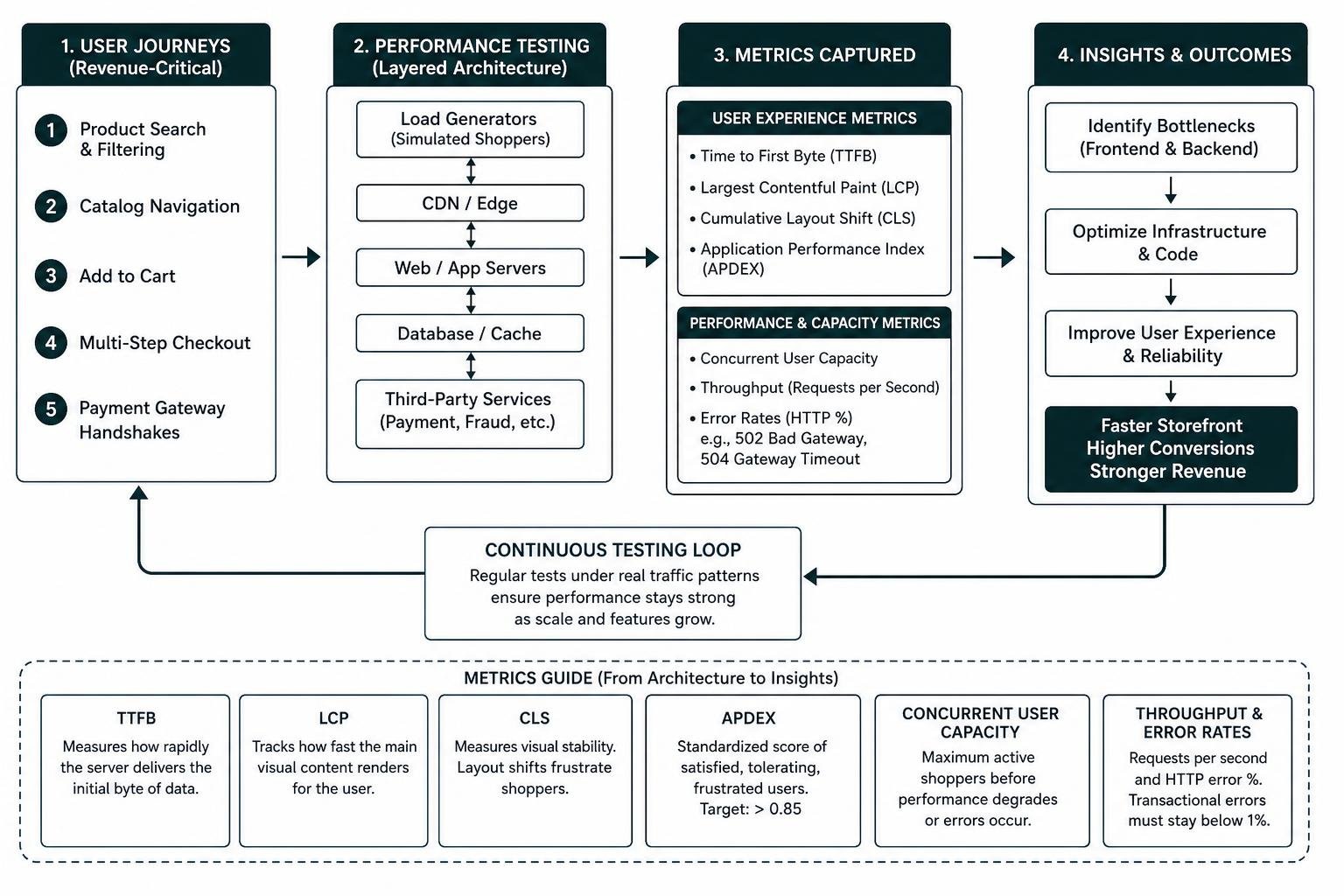
Performance testing must focus on the paths where revenue actually happens. While static marketing pages or blogs are simple to cache and serve quickly, transactional flows place dynamic demands on backend infrastructure.
You need to prioritize testing for:
- Product Search and Filtering: As visitors type queries or apply faceted filters, database indexes and search engines must return results in under 200 milliseconds.
- Dynamic Catalog Navigation: Category pages with real-time stock indicators, personalized pricing, and sorting options demand high database concurrency.
- Add to Cart Actions: Modern carts frequently rely on dynamic background requests to update totals without a full page refresh. If these endpoints stall, buyers assume the site is broken.
- Multi-Step Checkout: The transition from cart to shipping, billing, and tax calculation creates heavy, uncached database writes and session locks.
- Payment Gateway Handshakes: Third-party payment authorizations, fraud detection checks, and order confirmation generation must complete seamlessly under peak concurrency.
Optimizing these high-value touchpoints requires a balanced focus on both server responsiveness and front-end interface clarity. Learning how a website UI UX audit can save your conversion rate helps ensure that interface design and technical performance work together to maximize sales.
Essential Metrics in Ecommerce Website Performance Testing
To understand how your architecture behaves under stress, you must track both backend server indicators and front-end user experience metrics. Reviewing how to check site performance offers a strong foundation for establishing healthy operational baselines.
The essential metrics to monitor during test runs include:
- Time to First Byte (TTFB): Measures how rapidly the server delivers the initial byte of data. A high TTFB under load indicates overworked web servers, sluggish PHP workers, or unoptimized database queries.
- Largest Contentful Paint (LCP): Tracks how fast the main visual content renders for the user. In ecommerce, this is typically the primary product hero image or category banner.
- Cumulative Layout Shift (CLS): Measures visual stability. Layout shifts during add-to-cart actions or mobile scrolling cause accidental clicks and frustrate shoppers.
- Application Performance Index (APDEX): A standardized ratio converting response times into a single score reflecting satisfied, tolerating, and frustrated users. Healthy storefronts aim for an APDEX above 0.85.
- Concurrent User Capacity: The exact volume of active shoppers navigating the store simultaneously before response times degrade or errors occur.
- Throughput and Error Rates: Monitored as requests per second alongside HTTP error percentages (such as 502 Bad Gateway or 504 Gateway Timeout). Under heavy load, transactional error rates must remain below 1% to protect revenue.
Core Types of Ecommerce Website Performance Testing
Understanding your store’s performance profile requires multiple testing methodologies. A system might easily handle steady daily traffic yet crash during an unexpected promotional surge. Selecting the right testing approaches helps you find your speed bottlenecks using the best website performance testing tools before traffic surges occur.

Load and Stress Testing for Flash Sales and Seasonal Surges
Load testing evaluates how your platform behaves under anticipated peak traffic volumes. For instance, if analytics show your store averages 1,500 concurrent users during normal hours and peaks at 5,000 during product drops, a load test validates that response times stay stable at that 5,000-user mark over an extended window.
Stress testing pushes your infrastructure beyond its normal operating limits to locate its true breaking point. By incrementally adding virtual users until the application slows down or throws 500-series errors, you discover whether the database, CPU, memory, or external APIs fail first.
Soak or endurance testing runs a sustained, moderate load over several hours or days. This exposes slow-burning issues like memory leaks, session table bloat, and database connection leaks that standard short-duration tests completely miss.
Spike and Scalability Testing for Campaign Surges
Spike testing simulates dramatic, sudden traffic increases within seconds. This mirrors real-world scenarios such as viral social media posts, push notifications, or television features where 20,000 users arrive at once. The goal is to see whether your web servers scale automatically, how your caching layers absorb the blow, and how quickly the system recovers once the spike subsides.
Scalability testing evaluates your infrastructure’s ability to grow dynamically. It verifies that adding CPU cores, expanding database read replicas, or activating cloud auto-scaling groups translates into linear capacity gains without introducing software-level bottlenecks.
Evaluating Load Testing Tools and Platform-Specific Setup
Selecting the appropriate tooling depends on your architectural stack, engineering resources, and testing goals. The table below outlines how popular testing solutions compare for ecommerce environments:
| Tool | Primary Use Case | Scripting Language | Strengths | Best For |
|---|---|---|---|---|
| k6 | Developer-centric load & API testing | JavaScript / TypeScript | Modern CLI, CI/CD native, very low resource footprint | Modern headless stores, CI/CD pipelines, API testing |
| Apache JMeter | Enterprise load & transactional simulation | XML GUI / Java | Rich protocol support, mature ecosystem, complex logic | Monolithic platforms (Magento), complex custom flows |
| Google Lighthouse | Front-end Core Web Vitals & lab audits | Automated / JSON config | Standardized UX metrics, mobile emulation, clear audit tips | Front-end optimization, page rendering audits |
| LoadForge | Cloud-distributed cloud load testing | Python (Locust-based) | Easy scaling, simple scenario builder, global load injection | WooCommerce, Shopify, distributed global testing |

Testing Platform Architectures: Magento, WooCommerce, Shopify, and OroCommerce
Every major commerce engine exhibits unique architecture challenges under pressure:
WooCommerce
Because WooCommerce operates within WordPress, performance depends heavily on PHP worker availability, object caching, and database hygiene. Standard catalog browsing is easily cached via full-page caching, but actions like dynamic cart fragments and customer checkouts bypass the cache completely. Following a dedicated WooCommerce load testing guide helps you model realistic AJAX nonces, session handling, and database write loads.
Magento (Adobe Commerce)
Magento features an enterprise architecture that demands robust server resources. It includes a built-in suite for generating test fixtures across diverse catalog sizes. Utilizing the Magento 2 Performance Toolkit setup allows engineering teams to populate hundreds of thousands of SKU fixtures and run standard JMeter or k6 benchmarks to test complex indexing, Varnish caching, and checkout pipelines.
OroCommerce
Designed for high-concurrency B2B environments, OroCommerce handles complex pricing tiers, customer-specific catalogs, and large-order matrix checkouts. Implementing the OroCommerce load testing documentation helps teams configure k6 to simulate authenticated enterprise buyers interacting with large shopping lists and dynamic ERP sync points.
Shopify and Headless Frameworks
While hosted platforms like Shopify manage infrastructure scaling on their core checkout, custom storefronts built on headless architectures (using Storefront APIs, Next.js, or Remix) must be tested thoroughly. You must ensure that middleware layers, GraphQL endpoints, and external inventory microservices do not buckle under heavy request volumes.
Mobile vs Desktop Performance Simulation
With mobile devices driving roughly 72% of all ecommerce sales, testing desktop traffic alone leaves a massive blind spot. Mobile shoppers frequently browse on constrained CPU processors and fluctuating cellular networks (4G, 5G, or spotty Wi-Fi).
Testing mobile performance requires:
- Network Throttling: Emulating packet loss, latency jitter, and slower bandwidth to reflect real-world shopper conditions.
- Device CPU Throttling: Simulating mid-tier mobile chipsets that struggle with heavy client-side JavaScript execution.
- Layout Stability Audits: Ensuring that dynamic promotional banners, deferred fonts, and image carousels do not trigger layout shifts that ruin the mobile buying experience.
Pinpointing Root-Cause Bottlenecks and Infrastructure Optimization
When a load test reveals degrading response times, the next step is identifying the underlying cause. Performance bottlenecks typically stem from four primary layers:
Using diagnostic tools to isolate each stage of the network waterfall is vital. Leveraging website speed test insights from Pingdom allows you to dissect DNS resolution times, SSL handshake latency, and asset download speeds across various global testing locations.
To resolve these common bottlenecks:
- Implement Persistent Object Caching: Use Redis to cache complex database query results, transients, and user sessions.
- Clean Database Tables: Periodically purge abandoned cart logs, expired transients, and historical order revisions that slow down index lookups.
- Defer Non-Critical JavaScript: Load marketing pixels, live chat widgets, and review carousels asynchronously so they do not block initial rendering or checkout button interactivity.
Running Ecommerce Website Performance Testing in CI/CD Pipelines
Performance optimization is an ongoing process rather than a one-time project. High-performing engineering teams integrate load and performance checks directly into their CI/CD deployment workflows.
By embedding tools like k6 or Lighthouse into GitHub Actions or GitLab CI, every pull request can be measured against strict performance budgets. If a new code release increases TTFB by more than 10% or degrades LCP past 2.5 seconds, the automated build can fail before the problematic code ever touches production servers.
Frequently Asked Questions About Ecommerce Performance
How often should an online store run performance tests?
You should run automated synthetic tests on every code deployment via CI/CD. Comprehensive load and stress tests should be executed at least once a quarter, before any major marketing initiative, and 4 to 6 weeks prior to peak shopping holidays like Black Friday.
How do you safely test checkout without triggering live payment transactions?
Always test against an isolated staging environment that mirrors production specifications. Configure payment gateways to use test sandbox keys, tokenize simulated credit card numbers, disable outbound customer transactional emails, and mock external inventory webhooks.
What is an acceptable error rate and response time during high-traffic spikes?
During peak traffic spikes, your API and dynamic server response times should remain under 500 milliseconds (with cached pages loading in under 200 milliseconds). Error rates across critical shopping actions should consistently stay below 0.1% for healthy operations, and must never exceed 1% during extreme traffic spikes.
Conclusion: Build Resilient Architecture That Protects Peak Revenue
Unstable site speed and shopping cart crashes can quickly erode customer trust and undermine marketing investments. Ecommerce performance testing gives you the hard data needed to eliminate bottlenecks, optimize hosting resources, and ensure smooth checkouts during critical sales periods.
At ELMNTL, we help ambitious brands engineer digital shopping experiences that handle heavy traffic volumes while maintaining speed, stability, and high conversion rates. If you are ready to prepare your storefront for sustainable, high-volume growth, explore our scalable ecommerce web development services and build an online presence that performs under pressure.