

Why Growing Businesses Need CRM and CMS Platforms
CRM and CMS platforms solve different problems. A content management system (CMS) helps your team build and update a website. A customer relationship management system (CRM) helps your team track leads, customer conversations, and sales. Start with the system that fixes your biggest bottleneck. If your website brings in leads but follow-ups get missed, you likely need both.
Together, the systems can turn website interest into a clearer path to a sale. A visitor fills out a form on your CMS site, and their details reach the CRM so your team can follow up.
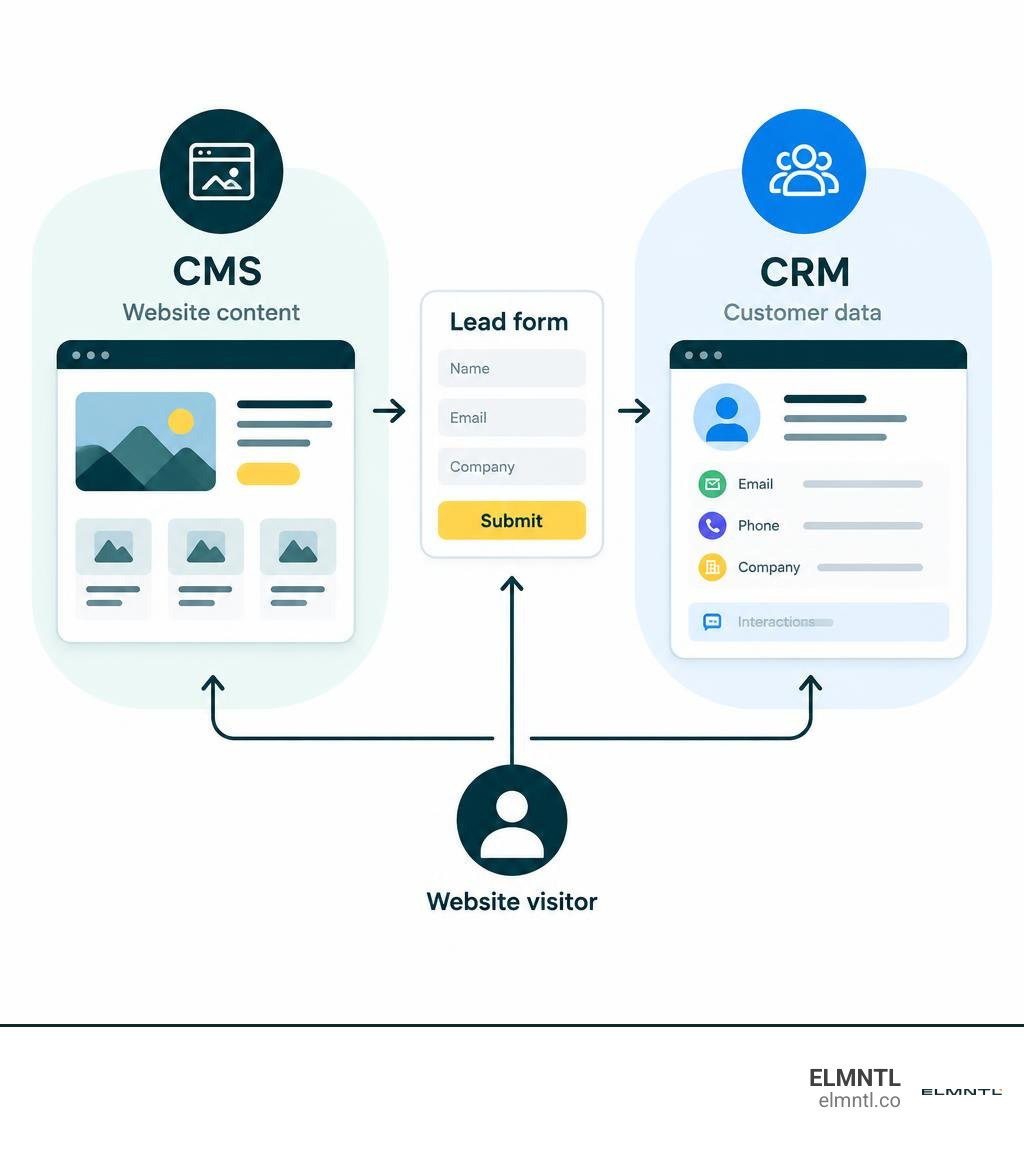
Crm and cms platforms vocab explained:
Understanding CRM and CMS Platforms: Core Differences and Capabilities
At their foundation, content management systems and customer relationship management systems manage two entirely different sides of your digital business. A CMS acts as your digital storefront and publishing engine. It focuses on outward-facing digital assets, structuring your pages, hosting your media, and delivering engaging experiences to a broad audience. In contrast, a CRM serves as your internal database of record for individual relationships. It captures every touchpoint across the buyer journey, storing contact information, logging email threads, tracking pipeline stages, and recording purchase histories.
The fundamental differences between these systems span their core purpose, target users, data structures, and direct business outcomes, as detailed in this TechTarget analysis on CRM and CMS differences.
| Feature / Dimension | Content Management System (CMS) | Customer Relationship Management (CRM) |
|---|---|---|
| Primary Purpose | Create, manage, publish, and optimize digital web content | Track, organize, and nurture leads, accounts, and client relationships |
| Data Focus | Unstructured and structured content (pages, blog posts, media assets, layout blocks) | Structured customer data (contact records, deal stages, activity timelines, purchase history) |
| Primary Users | Content creators, web designers, SEO specialists, marketing teams | Sales representatives, account executives, customer support agents, revenue leaders |
| Key Business Outcomes | Increased organic traffic, higher brand visibility, improved on-site conversion rates | Shorter sales cycles, improved lead-to-close rates, enhanced customer lifetime value |
| Automation Scope | Content scheduling, automated publishing, template generation, SEO meta-tagging | Lead scoring, follow-up reminders, pipeline stage transitions, task assignments |
| Security Focus | Web vulnerability protection, DDoS prevention, visitor privacy, access control | Sensitive customer data encryption, role-based database access, regulatory compliance |
Understanding how each system operates independently makes it much easier to select the right tools for your digital architecture.
What a CMS Does for Content and Audience Reach
A modern CMS is designed to remove technical barriers so your marketing team can publish and refine digital experiences without writing code for every update. Standard features include drag-and-drop page builders, media libraries, categorization taxonomies, and built-in SEO controls such as canonical tags, schema markup, and metadata editors.
WordPress powers over 40% of websites globally, demonstrating how accessible content publishing has become. However, as organizations scale, their requirements often outgrow off-the-shelf templates. Implementing custom CMS development best practices enables organizations to create modular, headless architectures that deliver content consistently across web portals, mobile apps, and customer dashboards while preserving fast page speeds and robust security.
What a CRM Does for Pipeline and Lead Management
While your CMS attracts visitors, your CRM ensures those visitors turn into revenue. A CRM system structures the entire sales operation by organizing contacts, accounts, deals, and communication histories into actionable views. Sales reps can view an entire timeline of customer interactions, from initial form submission to signed contract.
Key CRM capabilities include automated pipeline tracking, contact segmentation, deal forecasting, and activity logging. Establishing a modern CRM software business infrastructure gives leadership real-time visibility into revenue leaks, conversion bottlenecks, and team performance, transforming scattered lead data into predictable growth.
When to Implement Each System During Business Growth
Determining when to adopt each platform depends heavily on your current operational bottlenecks. In the earliest stages of a company, building market presence is usually the first priority, which makes a functional website essential. However, as market interest increases, managing leads manually quickly becomes unsustainable.
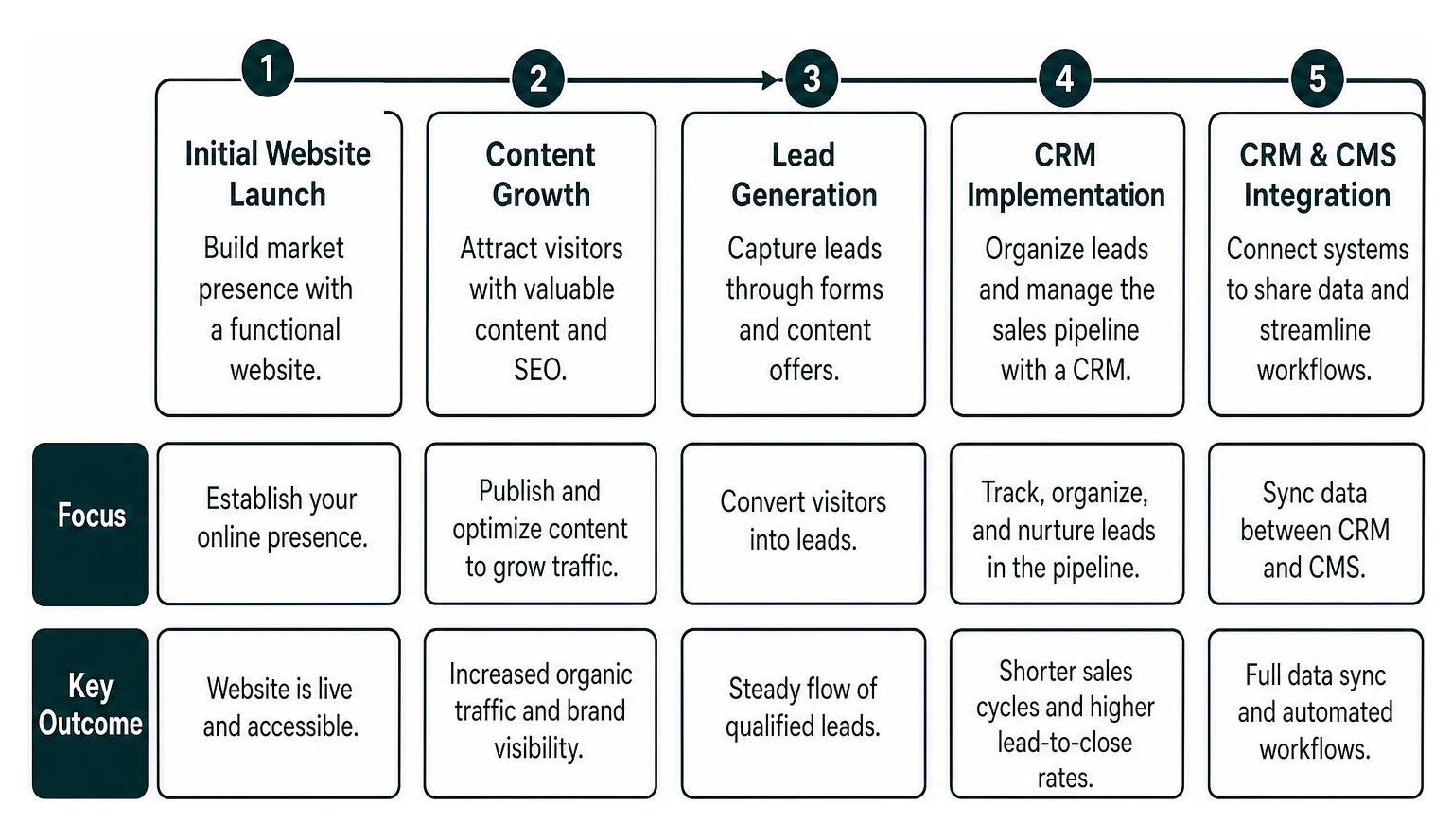
Evaluating CRM and CMS Platforms for Early-Stage Startups
Startups frequently face budget constraints and must prioritize where to invest capital and time. In most scenarios, businesses implement a CMS first because without a website, lead generation is difficult to sustain.
You should prioritize your CMS when:
- Your brand lacks a digital presence or your existing site prevents you from publishing regular product updates.
- Organic search and inbound content marketing are your primary acquisition channels.
- Your marketing team relies on external developers for simple copy and asset adjustments.
Conversely, you should prioritize or immediately add a CRM when:
- Inbound inquiries sit in shared email inboxes without assigned owners.
- Follow-ups depend on spreadsheets or personal notes, leading to dropped conversations.
- You have multiple sales reps who need to avoid contacting the same prospects simultaneously.
Clear Signs Your Company Requires Both Systems
As your business matures, using either a CMS or a CRM in isolation creates costly blind spots. Operating with disconnected systems leads to fragmented customer journeys and lost revenue opportunities.
Watch for these clear indicators that your business needs a tightly connected stack:
- High Traffic with Low Conversion Visibility: Your CMS analytics show thousands of unique visitors, but your sales team has no context on which articles or landing pages generated specific high-value leads.
- Generic Website Messaging for Existing Clients: Returning customers see the same generic introductory offers on your homepage because your CMS cannot read account status data from your CRM.
- Manual Data Entry Between Systems: Marketing manually exports CSV files from website forms and uploads them into a sales database, introducing delays and duplicate records.
- Poor Email Engagement: Email campaigns yield poor open and conversion rates because you lack behavioral data to segment lists accurately. Email marketing can return up to $36 for every $1 spent, but only when messages are targeted to specific segments based on accurate customer records.
How to Connect Your Software Stack for Maximum Impact
Connecting your CMS and CRM turns separate systems into a responsive revenue engine. When data flows between your front-end publishing layer and your back-end sales pipeline, every customer touchpoint becomes measurable and actionable.
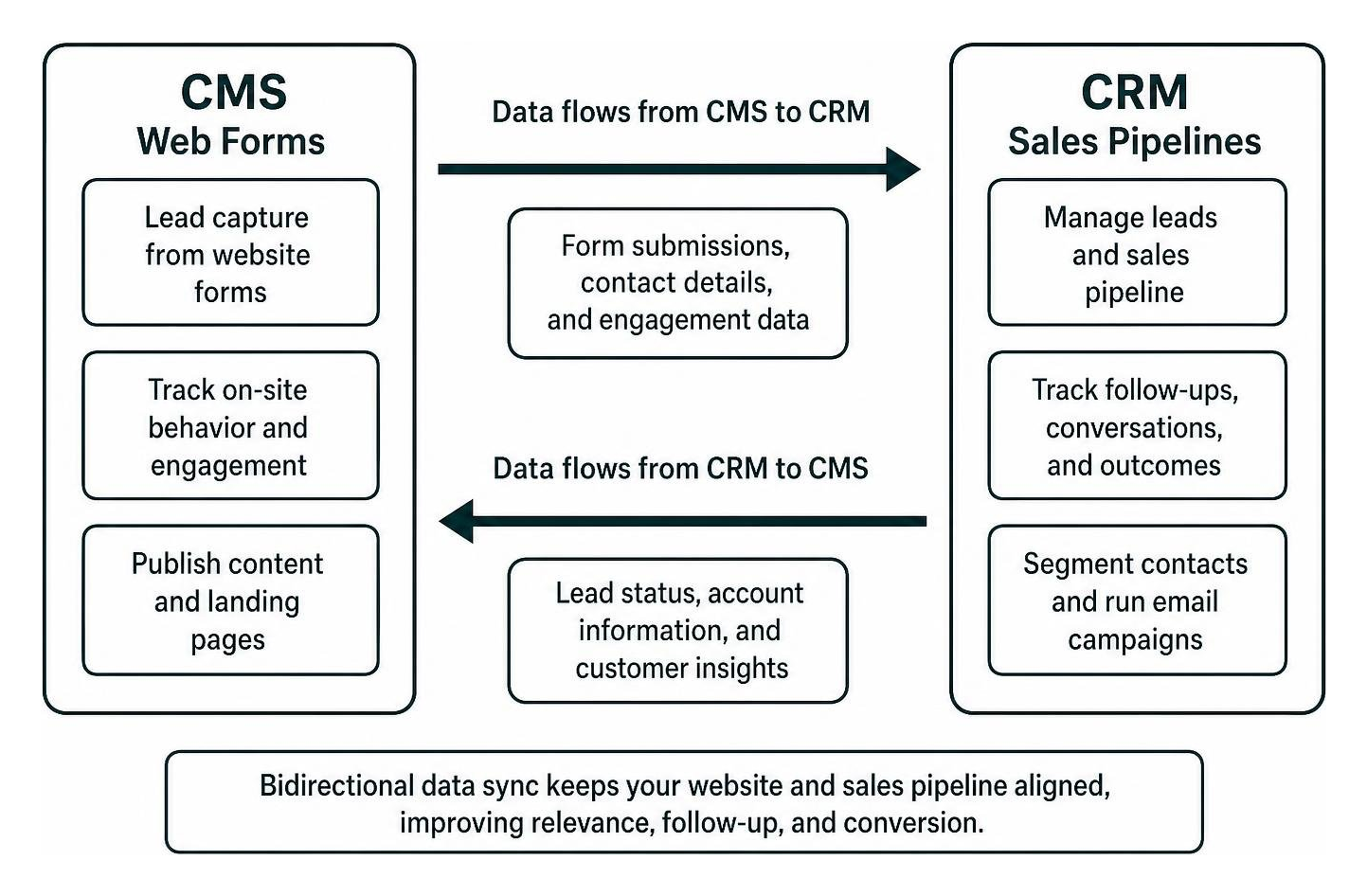
A unified data architecture ensures that lead intelligence captured during on-site browsing informs sales conversations, while sales outcomes help refine content strategy. You can explore how operational customer data connects with strategic reporting in our guide on CRM and business intelligence data flows.
Essential Integration Strategies for CRM and CMS Platforms
Integrating your systems can be achieved through native platform connectors, middleware solutions, or custom API endpoints. Regardless of the technical route you choose, four core integration workflows deliver the highest return on investment:
- Automated Lead Capture and Routing: Embed CRM-connected web forms and dynamic chat widgets directly onto CMS landing pages. When a visitor submits an inquiry, the integration instantly creates a new contact record, logs the referral source, and assigns a sales rep based on territory or product interest.
- Behavioral Tracking and Lead Scoring: Sync user actions on your CMS, such as viewing pricing pages, downloading technical whitepapers, or attending webinars, directly to the prospect’s CRM profile. This allows your sales team to prioritize outreach to accounts showing active buying signals.
- Dynamic Content Personalization: Use CRM data attributes (such as industry, company size, or lifecycle stage) to customize what returning visitors see on your CMS pages. A prospect in the healthcare sector can automatically see healthcare-specific case studies and testimonials on your homepage.
- Closed-Loop Marketing Attribution: Feed closed-won deal data from your CRM back into your CMS analytics. This reveals which blog posts and landing pages generate actual customer revenue, rather than just raw traffic.
Unified Systems vs. Dedicated Modular Toolsets
As platforms evolve, businesses often weigh all-in-one software suites against best-of-breed modular architectures. Unified platforms combine content creation, contact tracking, and marketing automation within a single vendor environment. Modular stacks pair a dedicated CMS with an independent, specialized CRM connected via APIs.
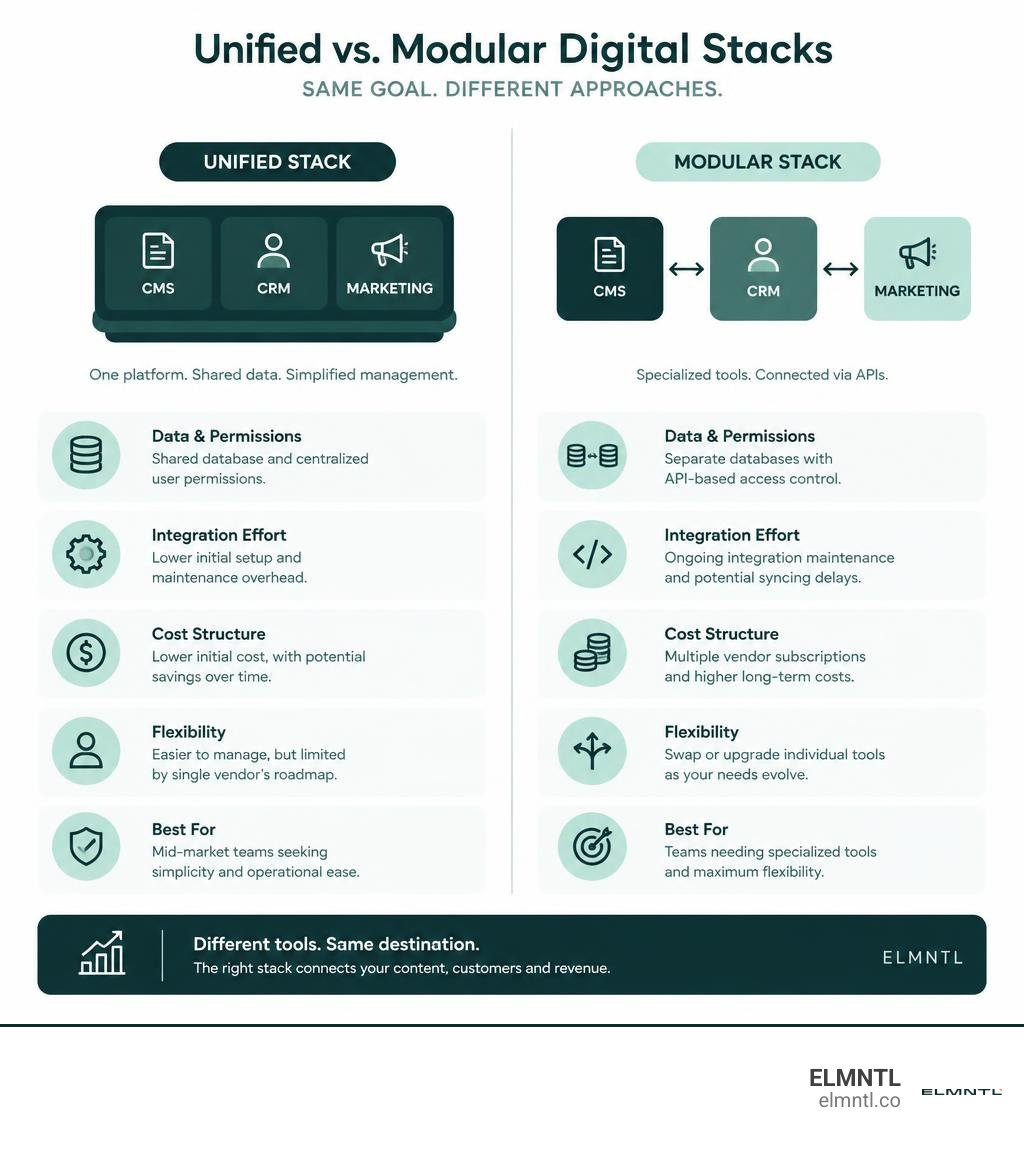
According to industry findings, unified platforms can save up to 35% when using PaaS compared to configuring and maintaining separate legacy systems. However, each approach presents distinct trade-offs:
- Unified Platforms: Offer centralized user permissions, shared databases, and lower initial integration overhead. They are well-suited for mid-market teams seeking operational simplicity without maintaining complex API layers. The main drawback is the risk of vendor lock-in and potential feature compromises compared to standalone, category-leading tools.
- Modular Best-of-Breed Stacks: Allow your team to pair specialized tools, such as an enterprise headless CMS with a dedicated sales CRM. This approach provides maximum flexibility, allowing you to swap out components as your strategy changes. The trade-off lies in higher integration maintenance, potential data syncing delays, and multiple vendor subscriptions. Reviewing unbiased Gartner Peer Insights research on web content management can help identify which architectural model fits your team’s internal technical capabilities.
Implementation Costs, Timelines, and Platform Selection
Planning your technology rollout requires balancing software licensing fees, internal resources, and implementation schedules. The pricing models and deployment timelines for CMS and CRM solutions differ significantly.
CMS platforms are typically priced around web traffic tiers, content volume, storage limits, and hosting infrastructure. Open-source CMS platforms may have zero initial license fees, but they require investments in hosting, ongoing maintenance, and custom theme development. Proprietary cloud CMS options generally charge flat monthly or annual subscriptions based on bandwidth and administrative seats.
CRM platforms, on the other hand, almost universally use per-user, per-month licensing models. Tiered pricing structures frequently gate advanced automation, custom reporting, and predictive scoring behind higher subscription plans. As your sales and support teams expand, per-seat costs scale alongside your contact database size.
Implementation timelines also follow distinct paths:
- CMS Implementation (1 to 12 weeks): Timelines vary based on page count, information architecture design, custom template requirements, and content migration. A standard corporate website redesign often wraps up in four to eight weeks, whereas complex enterprise multisite deployments require longer timelines.
- CRM Implementation (2 to 8 weeks): Deploying a CRM revolves around data hygiene, pipeline mapping, custom field configuration, and data migration from legacy spreadsheets. Training sales teams and refining automation workflows represent the bulk of the onboarding timeline.
Security considerations should also guide your selection. Security is consistently cited as a top reason teams switch CMS platforms. Ensure your chosen systems provide end-to-end data encryption, granular role-based access controls, automated data backups, and compliance with global privacy regulations such as GDPR and CCPA.
Frequently Asked Questions About CRM and CMS Technology
Is Salesforce considered a CRM or a CMS?
Salesforce is primarily an enterprise CRM platform built for managing customer relationships, sales pipelines, and support cases. While Salesforce offers content management capabilities through add-on modules and digital experience portals, it is not designed to serve as an organization’s primary marketing CMS. Most businesses pair Salesforce with a dedicated web CMS to power their public-facing websites.
Which platform should a business build first?
Most businesses should build their website on a CMS first to establish an online presence, showcase offerings, and generate initial market awareness. Once inbound lead volume, manual sales tracking, or multi-member sales coordination creates operational friction, adding a dedicated CRM becomes essential.
How long does it take to implement both systems?
Deploying both systems concurrently or in close succession typically takes between six and sixteen weeks depending on data volume, custom development needs, and integration complexity. A phased approach, beginning with CMS deployment followed by CRM setup and data synchronization, minimizes operational disruption.
Conclusion: Building a Scalable Digital Foundation
Scaling a modern business requires breaking down data silos between your marketing and sales departments. A standalone CMS builds brand authority and attracts qualified visitors, while a dedicated CRM ensures that every customer relationship is managed with precision. When integrated, these systems create a closed-loop digital ecosystem that personalizes user experiences, accelerates sales cycles, and drives predictable revenue growth.
Achieving this balance requires thoughtful architecture, strategic design, and seamless technical integration. At ELMNTL, we bring over 15 years of award-winning digital marketing, web development, and branding expertise to help growing brands construct cohesive technology stacks. Discover how our tailored digital growth services can align your digital platforms, optimize your sales funnels, and build an enduring foundation for scale.