
Core Principles Defining Modern UX Design in 2026
Modern user experience is no longer cosmetic dressing applied at the end of a software sprint. It is core product strategy and a direct driver of commercial growth. Research shows that design-led organizations outperform industry peers by 32% in revenue growth, while an optimized interface can lift conversion rates by up to 200%.
Achieving those numbers requires cutting through interface fatigue. Today, the average website homepage carries over 1,400 distinct elements, an increase of more than 22% in recent years. When interfaces drown users in visual clutter, cognitive clarity evaporates. Modern UX design cuts through this noise by grounding interface layouts in proven behavioral heuristics, robust architecture, and clear visual hierarchy.
Psychological Foundations and Modern UX Design Heuristics
Digital interfaces must work in harmony with human cognitive limits. According to Miller’s Law, human working memory holds roughly seven items at once, give or take two. Hick’s Law tells us that the time required to make a decision increases logarithmically with the number and complexity of choices. When an interface violates these laws, drop-off rates surge.
We manage cognitive load through progressive disclosure, showing only the essentials upfront while deferring complex settings to secondary screens. Understanding these behavioral baselines requires leaning into fundamental design principles and the rich evolution of user experience heuristics established over decades of usability research.
Using qualitative interviews, rapid prototype testing, and behavioral session recordings allows teams to map user intent before writing a single line of production code.
Balancing Visual Identity with Modern UX Design Simplicity
Simplicity does not mean sterile sameness. The wave of monochromatic software templates has left users craving interfaces with identity. Modern design achieves distinction through calm minimalism, structural modularity, and expressive typography.
- Bento Grid Layouts: Modular, card-based structures group complex data points into scannable compartments, creating natural responsive breakpoints across mobile and desktop.
- Structured Spacing Systems: Adopting an 8px spatial grid enforces rhythm, eliminates visual dissonance, and ensures balanced padding across components.
- Whitespace Allocation: Generous negative space enhances scannability and improves reading comprehension by up to 20%.
- Expressive Character: Bold type pairings, refined color tokens, and purposeful dark-mode palettes deliver brand character without adding visual bloat.
By harmonizing visual styling and user flow, brands build memorable interfaces that guide users smoothly toward conversion goals.
Emotional Design and Functional Micro-Interactions
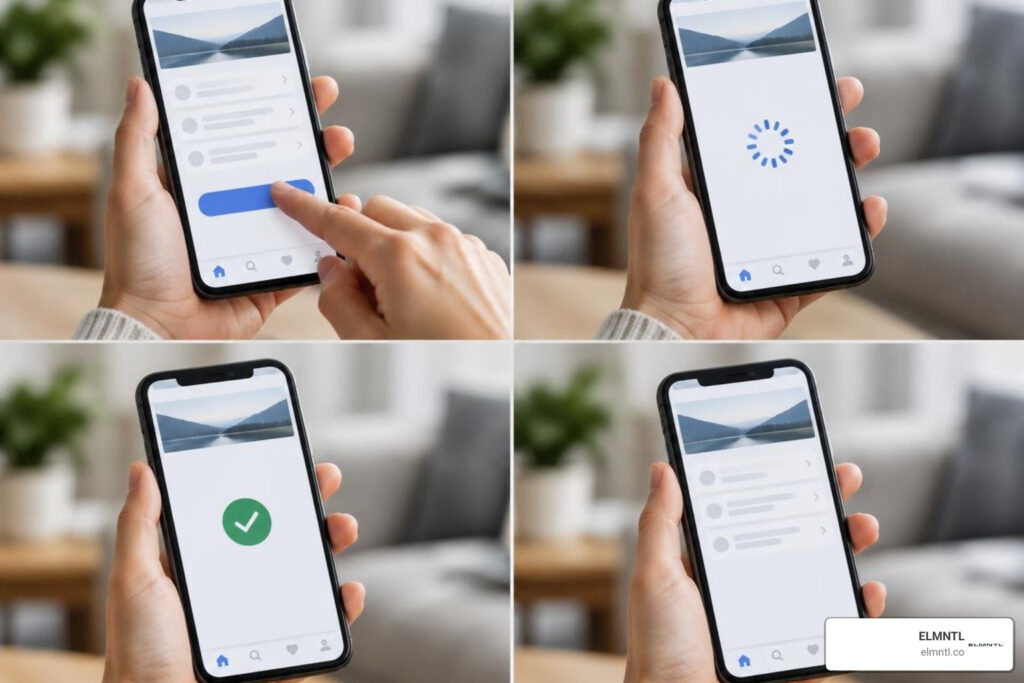
Micro-interactions are the subtle moments where interface mechanics meet human emotion. They provide continuous feedback, acknowledge user intent, and confirm completed actions.
A micro-interaction consists of four key stages:
- Trigger: The user clicks a button, swipes a card, or alters system state.
- Rules: The parameters that dictate how the component reacts.
- Feedback: The visual, auditory, or haptic cue confirming receipt under 300 milliseconds.
- Loops & Modes: The logic governing the component’s persistence or return to baseline.
Skeleton loaders mitigate perceived latency by outlining upcoming content rather than showing jarring blank screens. Subtle spring physics on button clicks reinforce physical presence, while contextual inline validations ease form completion. Implementing these essential UX best practices turns functional tasks into pleasant experiences.
The Next Frontier: Adaptive, Agentic, and Ambient Interfaces
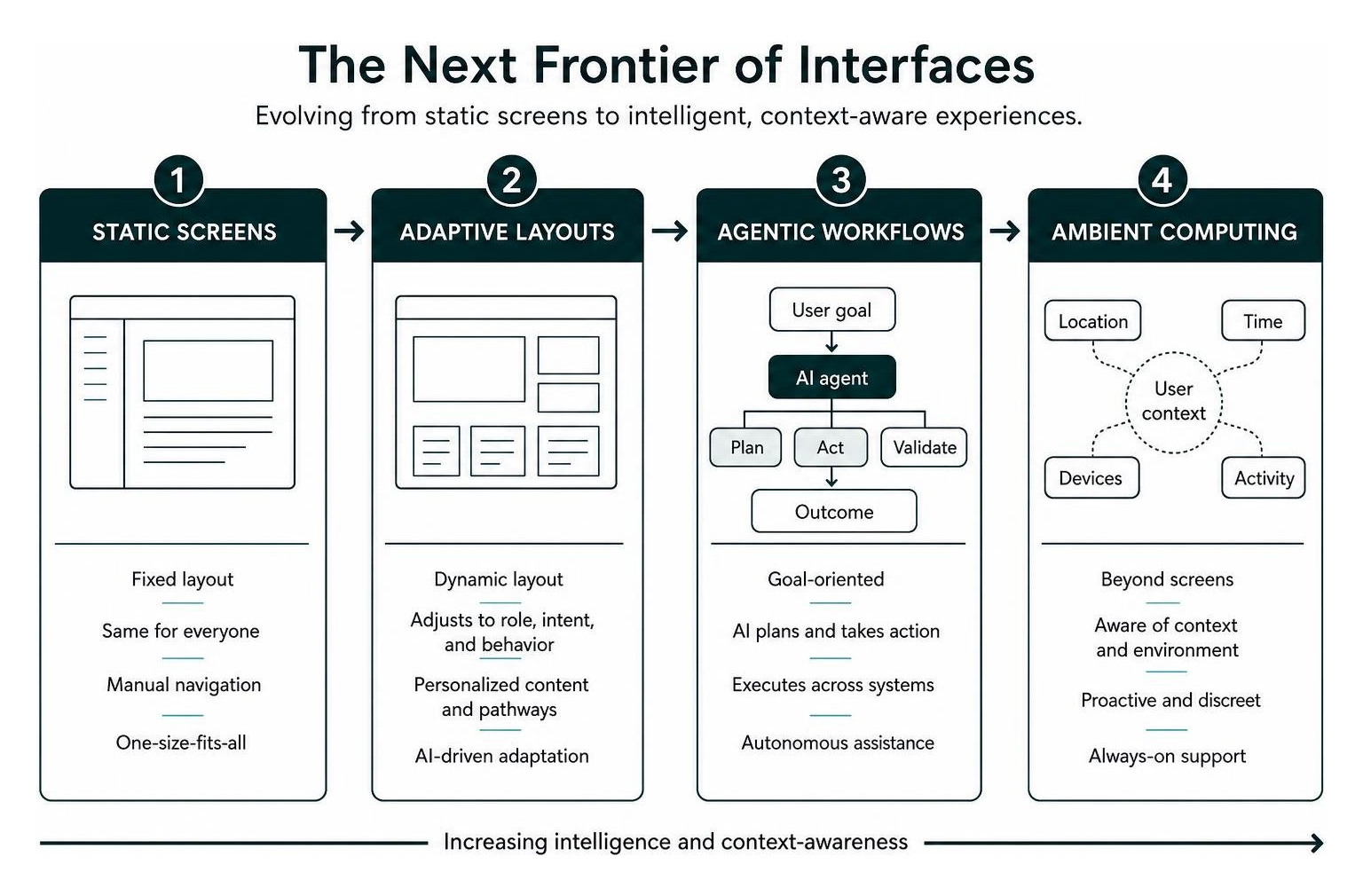
The way software interfaces are built is shifting beneath our feet. Static, one-size-fits-all pages are giving way to dynamic runtimes powered by AI and contextual computing.
AI-Driven Personalization and Adaptive Layouts
Adaptive interfaces do not rely on fixed templates. Instead, they dynamically adjust layout, information density, and functional pathways based on user intent, role, and historical behavior. Gartner projects that 30% of new applications will run AI-driven adaptive interfaces, up from under 5% just two years ago.
Companies that lead in personalization generate 40% more revenue than peers because their interfaces adapt to user needs. For instance, an enterprise analytics dashboard can reorder its widgets automatically when a user states they are preparing for a quarterly review versus investigating a live bug.
Adaptive systems draw from established human-centered design methods by keeping users in control. Every dynamic interface must provide visible manual overrides, clear indicators explaining why a screen shifted, and accessible fallbacks.
Agentic Execution and Ambient Computing
Agentic interfaces allow users to delegate tasks rather than clicking through multi-step forms manually. The UI transitions from static input forms to an intent box paired with a streaming view of the agent’s work.
| Interaction Model | User Role | Primary Interface Mechanism | System Response Time |
|---|---|---|---|
| Traditional UI | Direct Operator | Menus, form fields, click targets | Synchronous page reloads |
| Adaptive UI | Contextual Navigator | Intent-resolved dynamic layouts | Sub-200ms layout hydration |
| Agentic UI | Supervisor / Approver | Intent inputs, streaming action logs | Asynchronous task execution |
| Ambient UI | Passive Beneficiary | Pull-based notifications, glanceable HUDs | Contextual background alerts |
Ambient computing works discreetly in the background, surfacing updates only when necessary. An ambient surface respects focus, uses pull-based notifications, and integrates with voice, touch, and spatial inputs. Maintaining a seamless navigation architecture ensures users always understand where they are across these shifting modalities.
Performance, Accessibility, and Design System Infrastructure
Exceptional visual design falls flat if the underlying interface is sluggish or inaccessible. High-performing digital experiences rely on systematic engineering standards that prioritize universal access and swift load times.
Accessibility-First Architecture and Inclusive Compliance
With over 1.3 billion people living with a disability worldwide, accessibility is both an ethical responsibility and a regulatory requirement. Laws such as the European Accessibility Act have made WCAG 2.2 AA compliance mandatory for consumer-facing digital platforms. Yet, 95.9% of top homepages still fail automated accessibility checks, creating major friction for users and legal risks for companies.
Integrating these baseline measures aligns with fundamental UX design principles and broadens audience reach across every operating system.
Design Systems and Token-Based Governance
Scaling modern interfaces across multiple devices requires a unified design system. Design tokens serve as the single source of truth for design decisions, translating brand colors, typography scales, elevation levels, and spacing into platform-agnostic variables.

Using design tokens alongside atomic design principles provides clear benefits:
- Centralized Governance: Updating a single brand token propagates changes across web, iOS, and Android applications instantly.
- Reduced UI Bugs: Developers pull from vetted, accessible component registries rather than hard-coding styles.
- Accelerated Sprints: Teams using tokenized libraries prototype, test, and ship production-ready interfaces up to 8.6 times faster.
Periodically auditing website UI and UX health helps ensure design tokens remain organized, consistent, and free of bloat over time.
Technical Web Performance as Core UX
Speed is a pillar of user experience. Google data indicates that when page load times jump from 1 to 3 seconds, bounce rates increase by 32%. A 1-second delay in mobile responsiveness can lower conversion rates by up to 20%.
With mobile devices driving over 60% of global web traffic, maintaining solid Core Web Vitals is essential for modern search and retention. High-performing teams optimize assets, use code splitting, load non-critical resources asynchronously, and serve visual content through distributed content delivery networks.
Eliminating UX Debt: Common Pitfalls and Emerging Modalities
Digital debt accumulates when features are shipped quickly without removing outdated UI elements. Over time, bloated layouts frustrate users and degrade conversion funnels.
Data-Driven Iteration and Avoiding Common UX Mistakes
Fixing interface debt requires tracking qualitative and quantitative user data, identifying design mistakes, and running structured tests.
Reviewing conversion drop-offs, tracking heatmaps, and running iterative split tests reveals where users struggle. Following standard UX development stages and streamlining the design workflow for modern teams helps organizations remove visual friction while protecting their bottom line.
Designing for Voice, Multimodal, and Spatial UX
Interfaces are moving beyond flat screens into multimodal surfaces, spatial environments, and zero-UI platforms. Users now switch freely between voice commands, physical gestures, screen taps, and keyboard inputs within a single workflow.
- Multimodal Input Coordination: Systems must preserve conversational context whether a user enters data via a microphone, camera, or keyboard.
- Conversational Error Handling: Voice and conversational interfaces need graceful fallback options, helpful recovery prompts, and clear confirmation steps before running irreversible commands.
- Spatial Computing Constraints: Spatial and extended reality environments require ergonomic layouts, comfortable depth planes, and eye-tracking targets that avoid visual fatigue.
Studying hallmark examples of intuitive design shows that new platforms succeed when they keep interactions simple, familiar, and easy to use.
Frequently Asked Questions
How do contemporary digital experiences differ from traditional interfaces?
Traditional interfaces rely on static screens, fixed navigation menus, and manual form entries. Modern digital experiences use dynamic runtimes that adapt layouts based on user intent, support agentic task delegation, run on tokenized design systems, and adjust across voice, mobile, and spatial inputs.
Why is digital accessibility a legal and functional necessity in 2026?
Global legal standards, including the European Accessibility Act and updated WCAG regulations, require digital platforms to meet accessible design baselines. Functionally, over 1.3 billion people live with disabilities. Accessible design improves contrast, keyboard navigation, and structural clarity, creating a better experience for all users while protecting organizations from compliance penalties.
What metrics best measure the return on investment for UX overhauls?
The business value of UX improvements is measured through a mix of conversion and behavioral metrics:
- Overall conversion rate and revenue per user
- Task completion speed and error frequency
- Customer churn rates and Net Promoter Scores
- Core Web Vitals, including Interaction to Next Paint and Largest Contentful Paint
Conclusion
Building modern digital experiences means balancing brand character with practical usability. When you pair an accessible design system with responsive performance, thoughtful micro-interactions, and clear layouts, you create digital products that earn user trust and drive lasting business growth.
At ELMNTL, we help organizations cut through digital noise by crafting user experiences that combine distinctive brand identity with measurable commercial performance. Discover the tools and frameworks that power these dynamic interfaces by exploring the modern designer’s UI and UX toolkit.