
Deconstructing UI UX Design: Differences, Synergy, and Business Impact
To build digital products that people actually enjoy using, we have to look past surface aesthetics. Beautiful typography and modern color palettes cannot rescue a confusing workflow, just as a logically sound journey falls flat if the interface looks cluttered or untrustworthy.
Understanding UX and UI distinctions begins with how each discipline approaches human behavior. UX (User Experience) design focuses on the architecture of the journey. It explores how users think, where they encounter friction, and how quickly they can accomplish their core goals. UI (User Interface) design takes those structural solutions and translates them into tangible visual touchpoints, from interactive states and typographic hierarchy to spatial balance and responsive layouts.
When these two disciplines work in harmony, they reduce cognitive load and shorten decision latency, which is that split second hesitation between a user’s intent and their action. The business impact of getting this right is substantial. Companies ranking in the top quartile of the McKinsey Design Index achieve 32 points higher revenue growth compared to their industry peers. Investing in intentional design is not merely a cosmetic choice; it directly drives top line business performance.
| Dimension | User Experience (UX) Design | User Interface (UI) Design |
|---|---|---|
| Primary Focus | Structure, usability, journey logic, and user satisfaction | Visual hierarchy, branding, interactive elements, and aesthetic polish |
| Key Questions | “How does the user solve their problem efficiently?” | “How does the interface communicate options clearly and look cohesive?” |
| Core Deliverables | User personas, journey maps, information architecture, wireframes | High fidelity mockups, visual style guides, micro-interactions, design tokens |
| Validation Methods | Moderated usability testing, card sorting, task completion analysis | Visual accessibility reviews, design system audits, aesthetic preference tests |
Why User Research is Fundamental to UI UX Design
Assumptions are the most expensive liability in product development. When teams build features based on internal guesswork rather than verified customer needs, they risk shipping tools that solve problems nobody actually has.
Grounding your roadmap in user research eliminates this guesswork. Conducting ethnographic research and structured interviews with real participants reveals nuanced pain points that quantitative data alone cannot explain. For instance, in real world veterinary and agricultural platform deployments, qualitative testing with just 10 participants unlocked insights that drove a 63% boost in user retention alongside a 33% reduction in bounce rate.
Research also uncovers massive commercial opportunities across transactional journeys. Baymard Institute research indicates that approximately 70% of online shopping carts are abandoned prior to purchase, with over $260 billion in lost orders recoverable across the US and EU through checkout flow optimization alone. Regular evaluations, such as a comprehensive UI UX audit, allow teams to isolate high friction drop off points and systematically resolve them before they drain revenue.
Resolving Product Underperformance Through Intentional UX
When a digital platform underperforms, founders and product leads often rush to add more features or increase marketing spend. However, feature bloat usually worsens the underlying problem. Most digital products underperform due to three root causes:
- Onboarding Friction: Overwhelming first time visitors with complex setups before delivering visible value.
- Navigation Bottlenecks: Burying essential functions under convoluted menu hierarchies.
- Decision Latency: Forcing users to process too many competing visual cues on a single screen.
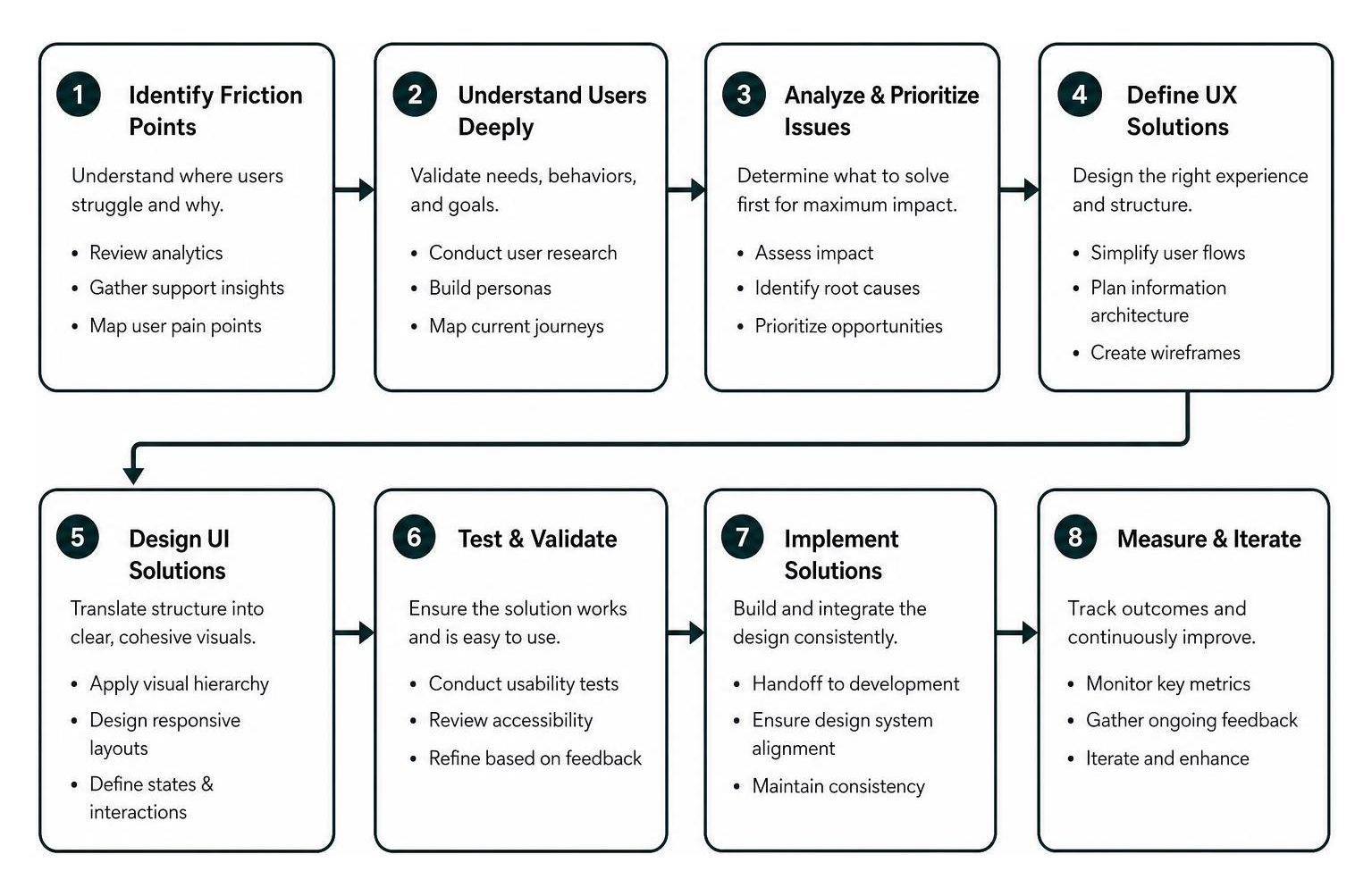
By applying evolving interaction design principles, teams can declutter visual interfaces and clarify next steps. Streamlining data visualizations, reducing multi-step forms into bite-sized interactions, and creating clear feedback loops can turn struggling products into scalable revenue engines. In fintech and HR tech environments, restructuring complex dashboards has driven 40% increases in user engagement and lifted overall enterprise platform revenue significantly.
The End-to-End Digital Product Design Lifecycle
Building a polished product requires a structured, repeatable methodology. Rather than jumping straight into high-fidelity layouts, mature design teams navigate distinct stages to ensure technical feasibility and commercial viability.
Following the industry standard UX design process ensures that every interface element serves a measurable user requirement:
- Discovery & Strategic Alignment: Uncovering business goals, conducting competitive benchmarking, and aligning on key product KPIs.
- User Research & Synthesis: Interviewing target audiences, developing realistic personas, and mapping workflows.
- Information Architecture (IA): Organizing content structures, sitemaps, and core navigation models.
- Wireframing & Interaction Design: Drafting low-fidelity screen layouts to test conceptual flows rapidly.
- UI & Visual Design: Applying design tokens, accessible color palettes, typography, and responsive grid layouts.
- Usability Validation: Testing interactive prototypes with target users to uncover functional bottlenecks.
- Implementation Support: Partnering with engineering teams during development to ensure pixel-perfect fidelity.
A central tool throughout this lifecycle is user journey mapping. Mapping out every emotional high and low across a user’s session helps pinpoint precisely where guidance, reassurance, or visual cues are needed most.
Validating Concepts and Mitigating Engineering Risk
Writing custom production code is the most expensive phase of digital product development. Fixing a flawed feature after launch can cost up to ten times more than resolving that same friction point during the design phase.
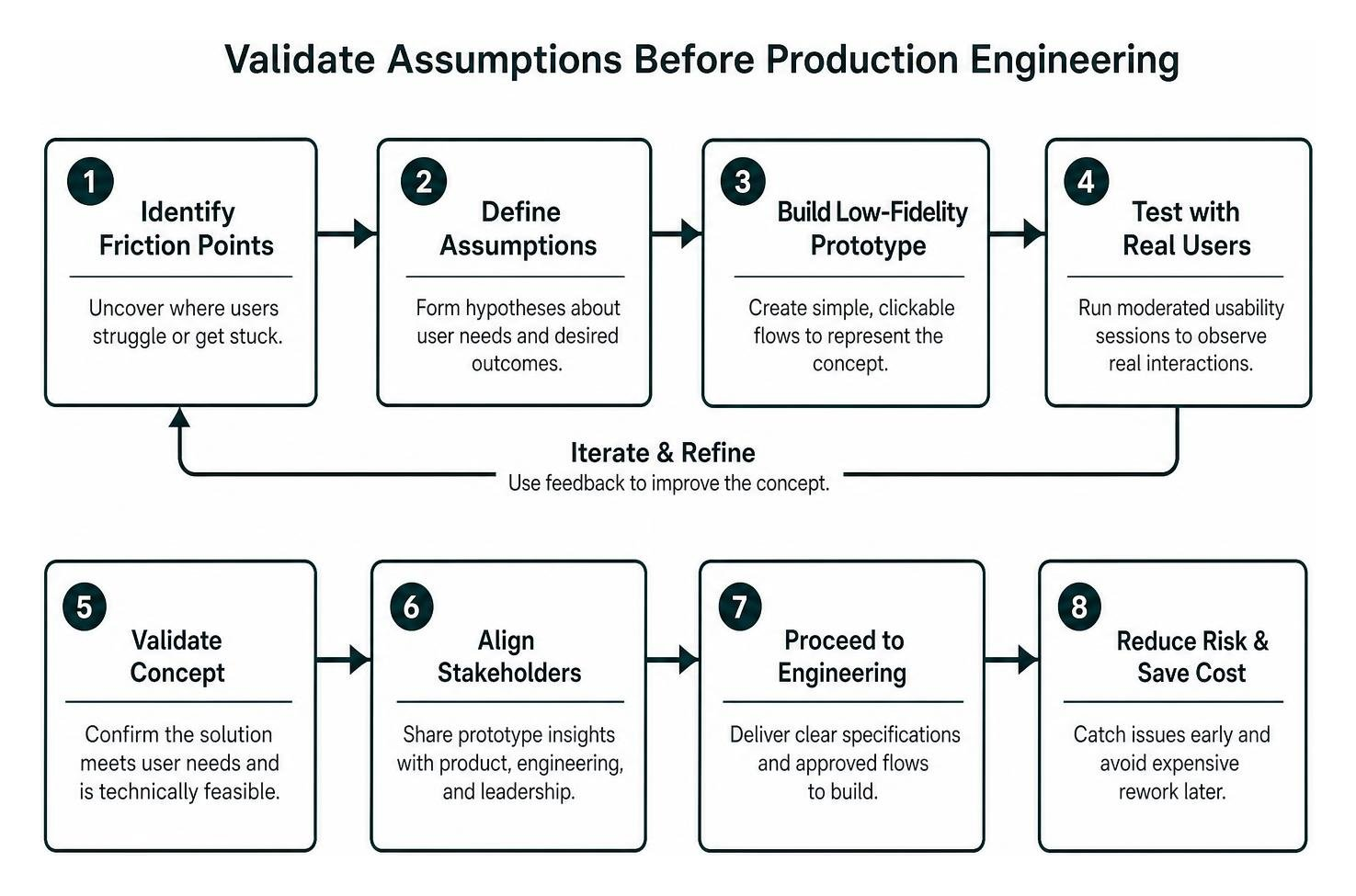
To protect budgets and preserve engineering momentum, teams validate their hypotheses using low-fidelity prototypes before writing code. Moderated usability sessions allow designers to watch real users interact with workflows, exposing hidden confusion in task completion.
Leveraging modern high-fidelity prototype tools enables us to simulate micro-interactions, complex filtering, and dynamic content states. This creates a realistic preview that product managers, engineers, and executive stakeholders can evaluate together. By validating user satisfaction and technical feasibility up front, engineering teams receive clear specifications and avoid costly mid-sprint redesigns.
Scaling Interfaces Across Industries and Design Systems
While foundational design principles apply everywhere, different industries present unique regulatory constraints, operational workflows, and user expectations.
- Fintech & Banking: Users require instant transparency, clear security cues, and low decision latency during high-stakes financial operations. Simple visual feedback, such as explicit confirmation modals and biometric authentication prompts, builds long-term trust.
- Healthcare & Telehealth: Interfaces must comply with strict privacy standards like HIPAA while remaining legible for stressed patients and busy clinicians. Shadowing clinical workflows helps designers surface critical vitals in a single glance without visual noise.
- Enterprise SaaS: Modern B2B tools manage vast amounts of data. Effective SaaS design relies on customizable dashboards, predictable keyboard navigation, and clear information hierarchy to streamline daily operations.
- E-Commerce: Frictionless product filtering, transparent pricing displays, and streamlined one-page checkouts turn casual browsing into completed orders.
Across every sector, delivering inclusive and accessible design that adheres to WCAG standards ensures interfaces remain usable for people of all abilities and assistive technologies.
Design Systems and Component Library Architecture
As digital platforms scale, maintaining design consistency across dozens of screens and micro-frontends becomes challenging. Without a centralized framework, teams produce duplicate components, fragmented UI styling, and bloated codebases.
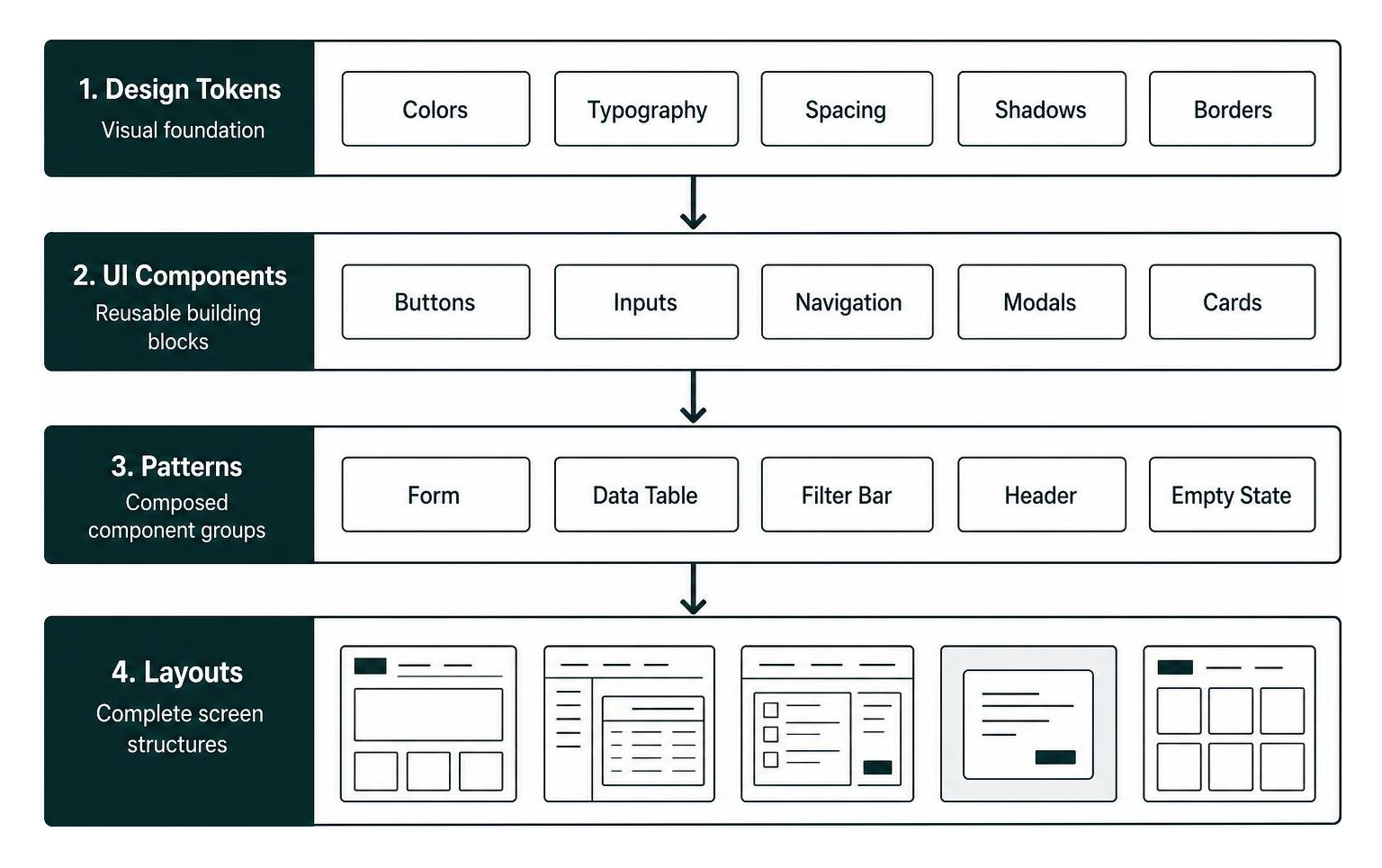
A comprehensive design system solves this by uniting design tokens (colors, typography, spacing, shadows) with functional UI components (buttons, input fields, navigation bars, modals). Connecting design systems directly to front-end libraries through frameworks like Storybook helps teams bridge the gap between design files and live production environments.
By building scalable design systems, organizations can cut development time for new features by up to 50%. Engineers can reuse pre-tested, accessible components directly, freeing them to focus on core platform architecture rather than re-creating interface elements from scratch.
Project Scopes, Engagement Models, and Post-Launch Performance
Choosing the right operational model for your design initiatives depends on your internal team capabilities, immediate deadlines, and long-term product vision.

Organizations generally evaluate three working structures:
- Freelance Designers: Well-suited for discrete, localized tasks like single landing pages or visual updates. However, solo contractors often lack the multi-disciplinary breadth needed for in-depth user research and enterprise design systems.
- In-House Designers: Ideal for ongoing, mature product maintenance. However, recruiting and onboarding senior design talent requires significant time and overhead.
- Design Agencies: Best suited for end-to-end product design, legacy modernizations, and rapid market entry. Agencies bring cross-functional teams of UX researchers, UI specialists, and design system architects who can deliver comprehensive solutions quickly.
| Engagement Type | Typical Timeline | Core Objectives & Deliverables | Best Suited For |
|---|---|---|---|
| UX & UI Audit | 2 to 3 weeks | Heuristic evaluation, accessibility review, friction analysis, actionable redesign backlog | Existing platforms suffering from conversion drops or high bounce rates |
| Research & Design Sprint | 4 to 8 weeks | User interviews, wireframes, rapid interactive prototypes, usability validation reports | New feature validation or strategic product pivots needing de-risking |
| Full Product Design & Design System | 8 to 16 weeks | Complete user journey mapping, high-fidelity UI, component library, developer handoff | Zero-to-one product builds or comprehensive platform modernizations |
| Embedded Design Partnership | Ongoing (Monthly) | Continuous sprint integration, feature expansion, design system governance, conversion optimization | Growing SaaS platforms needing dedicated, scalable design expertise |
Post-Launch Metrics to Track UI UX Design ROI
Shipping a redesigned interface to production is an important milestone, but it is not the finish line. To evaluate the true return on investment of your design efforts, track both behavioral usability metrics and commercial outcomes:
- Task Success Rate & Completion Time: How quickly and accurately can users accomplish core workflows without assistance?
- Decision Latency & Error Frequency: Are users encountering validation errors or hesitating at key interaction points?
- Conversion & Cart Completion Rates: What percentage of qualified visitors successfully complete your primary conversion funnels?
- Customer Satisfaction (CSAT) & Net Promoter Score (NPS): How do users perceive the ease and utility of the updated platform?
- User Retention & Churn Reduction: Are customer cohorts returning more frequently over 30, 60, and 90 day intervals?
Tying design decisions directly to measurable business KPIs helps teams ensure that every product enhancement drives meaningful business value.
Frequently Asked Questions About UI UX Design
What is the primary difference between UI and UX design?
UX design focuses on the overall journey, information structure, and usability of a product, ensuring that users can accomplish their goals with minimal effort. UI design focuses on the visual and interactive touchpoints, including typography, color palettes, component styling, and micro-interactions, ensuring the product looks clear, professional, and accessible.
How much does a professional UI UX design project typically cost?
Project costs depend on scope, complexity, and engagement structure. A targeted UX audit typically ranges from $5,000 to $15,000. Focused research and rapid design sprints often range from $25,000 to $60,000, while complete end-to-end digital product designs with scalable design systems range between $60,000 and $180,000. Embedded, ongoing design partnerships generally operate on monthly retainers between $15,000 and $40,000.
How do design systems speed up development cycles?
Design systems provide a shared library of standardized components, interaction guidelines, and design tokens that bridge the gap between design and engineering. By reusing pre-tested, accessible elements, developers can build consistent screens faster, reducing redundant coding and cutting feature development cycles by up to 50%.
Conclusion
Exceptional digital products do not emerge by accident. They are built on deliberate user research, intuitive interface architecture, and continuous usability validation. When organizations align clear user journeys with structured visual design systems, they eliminate operational friction, reduce engineering waste, and build sustainable market advantages.
Whether you are launching a zero-to-one digital platform or optimizing an enterprise ecosystem, investing in intentional design helps turn complex user journeys into measurable business growth. To explore the modern tools that help streamline interface workflows, take a closer look at our breakdown of the best UI and UX software available today.