

Introduction
Mapping user journey workflows starts with selecting one evidence-based persona, defining a single goal-driven scenario, and breaking the experience into chronological phases. For each phase, record the user’s actions, thoughts, and emotional highs and lows, then pair every friction point with a prioritized product improvement. This turns raw behavioral data into a shared visual timeline that engineering, design, and marketing can use to fix measurable drop-offs.
Every product team has a mental model of how their software should work. We design clean screens, map out happy paths, and assume users will move effortlessly from signup to their first key achievement. In reality, modern users hit confusing menus, abandon empty states, and bounce before seeing the core value of our work.
A recent study of over 500 SaaS products found that the median activation rate hovers at roughly 36%. That means nearly two out of every three new users leave without ever experiencing the core value the product was built to deliver.
Closing that gap requires moving past guesswork. By focusing on genuine user behavior, teams can build empathy-driven workflows that solve friction at its source.
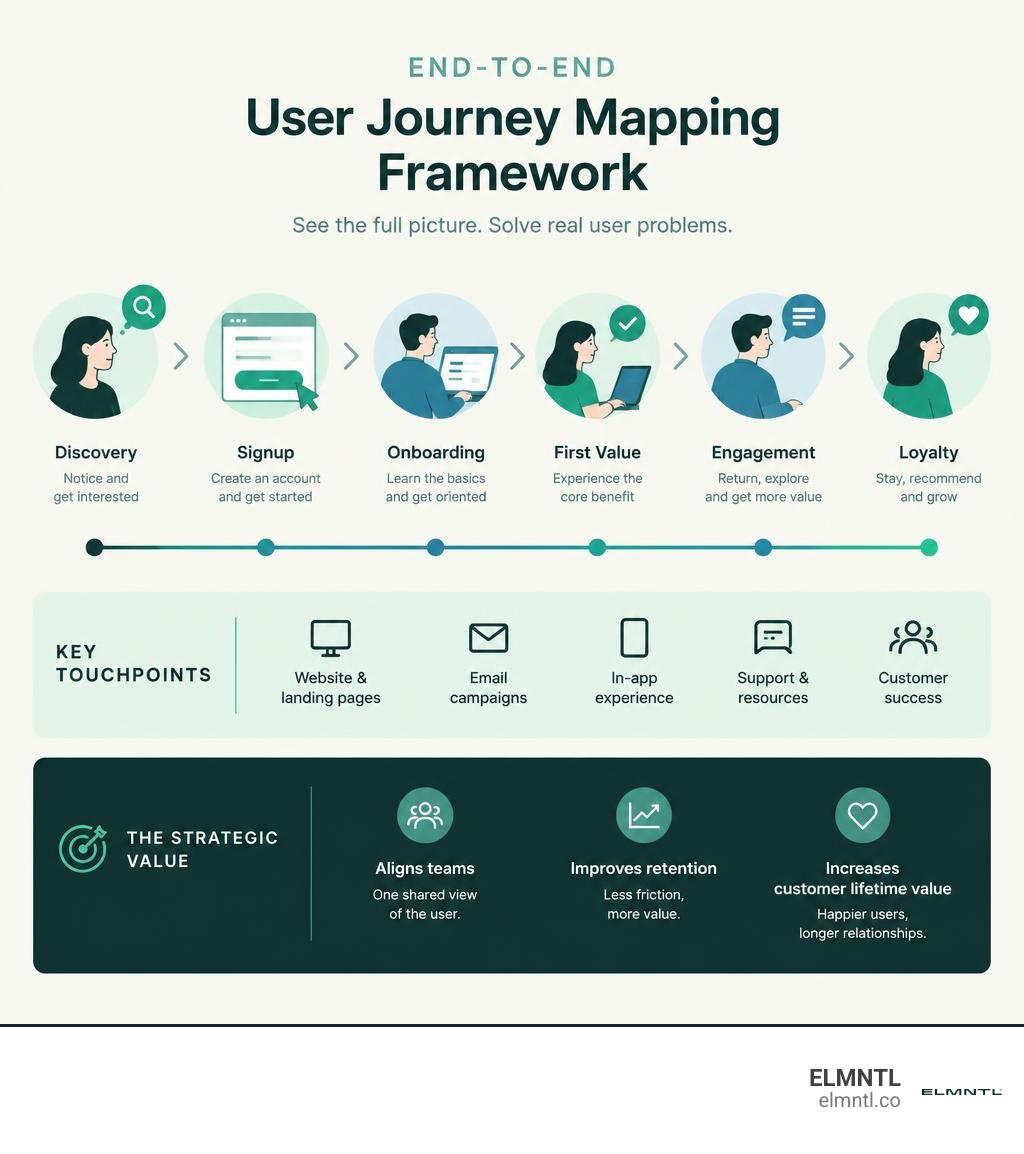
The Strategic Value of Mapping User Journey Touchpoints
Building a visual timeline of the customer experience does more than organize sticky notes. It serves as a single source of truth across engineering, design, marketing, and customer success. When teams share an objective view of where users struggle, they stop debating subjective opinions and start fixing measurable drop-offs.
A well-executed journey map directly influences customer lifetime value and long-term retention. Connecting front-end campaigns with post-login reality allows organizations to succeed at aligning marketing and customer experience, ensuring product promises match actual software delivery.
User Journey Maps vs. Customer Journey Maps
While these terms are often used interchangeably, they serve distinct strategic purposes:
- Customer Journey Maps look broadly at the entire relationship between an individual and a brand. They track high-level stages across marketing channels, sales outreach, contract negotiations, billing, and long-term customer support.
- User Journey Maps zoom in on specific, hands-on interactions within a digital product or website. They focus on how an individual accomplishes a concrete task, documenting screen-level decisions, cognitive friction, emotional shifts, and software touchpoints.
For digital teams, diving into a comprehensive user journey mapping guide helps clarify these differences and keeps product discovery focused on user behavior.
Business Impact on Adoption, Churn, and Marketing ROI
Journey management delivers measurable commercial advantages. Research from the Aberdeen Group indicates that companies operating formal journey management programs achieve 54% greater year-over-year return on marketing investment compared to those without one.
Furthermore, these organizations generate 3.5 times more revenue from customer referrals. When you eliminate early product friction, onboarding velocity accelerates, users hit their milestones faster, and retention compounds naturally.
Core Anatomy and Variations of Journey Maps
To build an artifact that drives change, teams must understand the foundational structure of a map. Grounding your framework in Nielsen Norman Group’s journey mapping foundation ensures your team captures human behavior rather than just technical system states.
Key Building Blocks of an Effective Journey Artifact
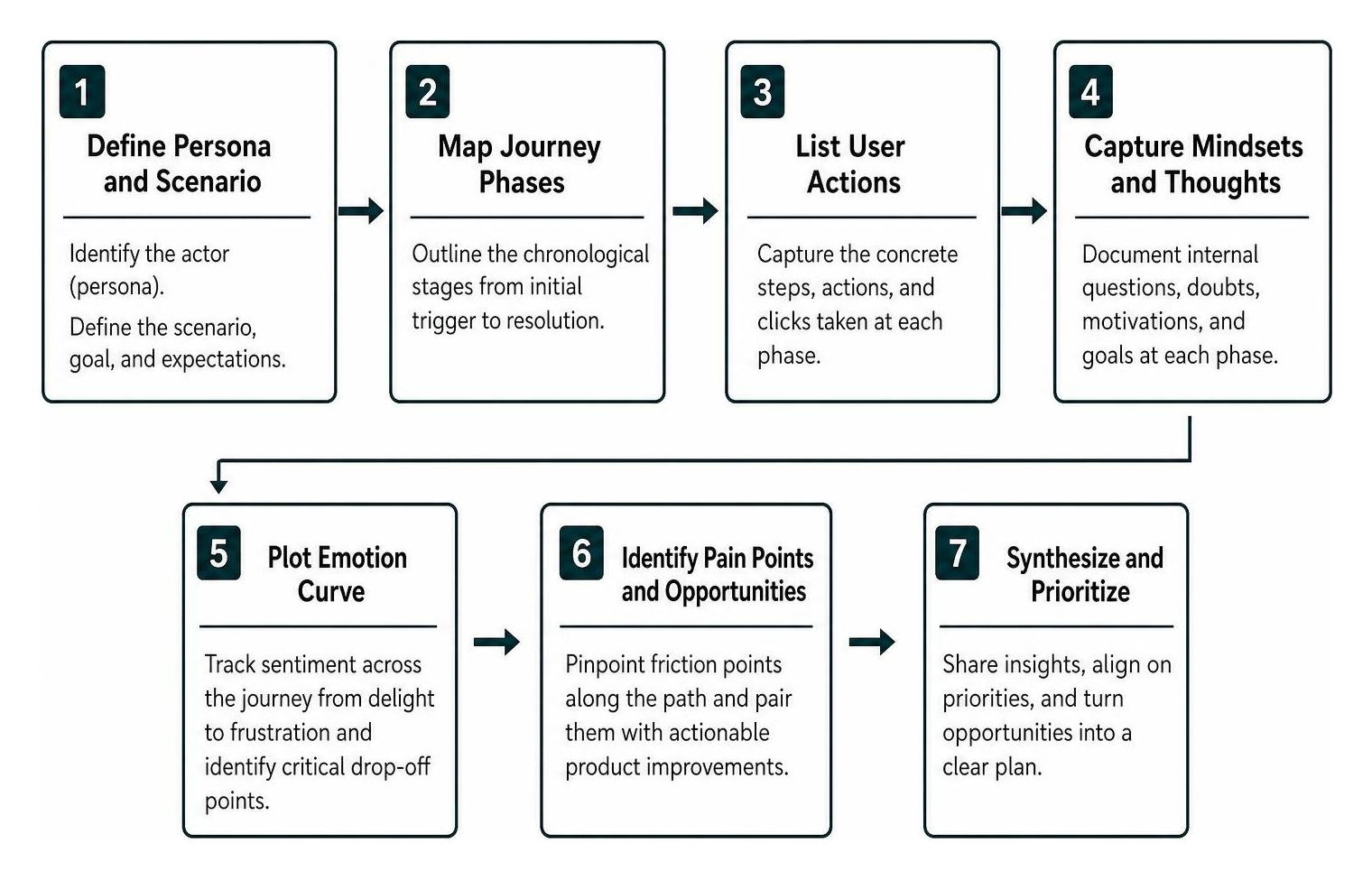
Every reliable journey map consists of seven core elements:
- Actor (Persona): The specific user whose perspective the map reflects. Mapping everyone creates a map for no one.
- Scenario and Expectations: The specific circumstance and goal the actor wants to achieve, including their baseline expectations.
- Journey Phases: The chronological stages of the experience, moving from initial trigger through resolution.
- User Actions: The concrete steps and clicks the user takes at each stage.
- Mindsets and Thoughts: The internal questions, doubts, and motivations the user experiences throughout the process.
- Emotion Curve: A continuous line tracking sentiment from delight to frustration, identifying critical points of drop-off.
- Pain Points and Opportunities: The friction points uncovered along the path, paired with actionable product improvements.
Five Map Types: Current-State, Future-State, and Beyond
Different product challenges call for different mapping approaches:
- Current-State Maps: Document how users interact with your software today. They are ideal for identifying existing usability issues, funnel drop-offs, and onboarding leaks.
- Future-State Maps: Illustrate an ideal, friction-free experience for a product or feature that is still in development.
- Day-in-the-Life Maps: Capture a user’s broader daily routine, habits, and environmental distractions, regardless of whether they are actively using your product.
- Service Blueprints: Expand a user journey map downward to reveal the behind-the-scenes systems, staff actions, and database calls required to support each front-end touchpoint.
- Experience Maps: Provide a generalized, product-agnostic overview of human behavior when solving a problem in a given domain.
| Map Type | Primary Focus | Best Time to Use | Key Output |
|---|---|---|---|
| Current-State | Existing user experience and live friction points | Optimizing live funnels, debugging onboarding, reducing churn | Prioritized backlog of UX fixes and bug tickets |
| Future-State | Idealized vision for new features or workflows | Vision planning, major redesigns, new product launches | North-star product requirements and wireframes |
| Day-in-the-Life | Broader daily habits and external context | Early discovery, strategic positioning, TAM expansion | Unmet needs and lifestyle integration opportunities |
| Service Blueprint | Front-stage user actions linked to back-stage tech | Operational overhauls, cross-team handoff alignment | System architecture changes and support workflow updates |
| Experience Map | Human behavior agnostic of specific products | Market research, greenfield innovation | Broad market insights and domain-level problem spaces |
Step-by-Step Guide to Building an Actionable Journey Map
Creating a practical map requires moving from raw evidence to shared strategic priorities.
Defining the Persona, Scope, and User Scenario
Begin by scoping your map tightly. Select a single, evidence-based persona rather than an idealized customer profile. Define a clear starting point and a concrete finish line.
For instance, rather than attempting to map the entire customer lifecycle in a single exercise, focus on a scenario like: “A newly invited team administrator setting up their first project workspace within 24 hours of invitation.”
Quantitative and Qualitative Inputs for Mapping User Journey Data
Never build a map purely on internal assumptions. Teams must blend hard product metrics with qualitative insights to understand both what is happening and why.
- Quantitative telemetry: Review analytics funnels, drop-off rates, time-to-first-action, and rage clicks.
- Qualitative discovery: Interview active users, watch session recordings, review sales objections, and audit support tickets.
When preparing your research plan, consider our guide on conducting research for journey mapping to gather unbiased user feedback efficiently.
Mapping User Journey Stages Across the Full Lifecycle
Once your research is synthesized, break the narrative into clear chronological phases:
- Awareness: The user realizes a problem exists and discovers your solution.
- Consideration: They compare workflows, evaluate pricing, and review feature capabilities.
- Trial / Signup: The initial registration and authentication flow.
- Onboarding & Activation: The critical window where they explore the interface and reach their first key milestone.
- Regular Use: The formation of recurring habits and ongoing operational tasks.
- Renewal / Expansion: Upgrades, license additions, or contract renewals.
- Advocacy / Churn: The point where the user either champions the product to peers or disengages entirely.
Mapping these stages helps teams uncover patterns across complex customer touchpoints, as detailed in our analysis of visualizing touchpoints that convert. For organizations serving international audiences, incorporating findings from global shopper journey research ensures localized checkout and cultural preferences are addressed.
Visualizing Friction Points, Mindsets, and Emotion Curves
Plotting the emotion curve transforms a basic flow diagram into an actionable journey map. Record user sentiment on a simple scale, noting peaks of excitement and dips of frustration.

Categorize friction points systematically:
- Usability Friction: Confusing navigation, broken validation states, or unclear labels.
- Cognitive Friction: Overwhelming choices, missing defaults, or excessive form fields.
- Trust Friction: Unclear pricing, unexpected data permissions, or sudden security prompts.
Operationalizing Journey Insights into Product Improvements
A journey map should never be treated as a static presentation deck. Its real value comes from turning identified friction into shipped software updates. Knowing how to measure these workflows starts with tracking the user journey of a website across modern analytics stacks.
Prioritizing UX Fixes with Impact-Effort Matrices
Once friction points are mapped, turn every dip on the emotion curve into a focused design challenge. Score each challenge using an Impact vs. Effort matrix or RICE scoring model (Reach, Impact, Confidence, Effort).

- Quick Wins (High Impact, Low Effort): Fix ambiguous button labels, simplify sign-up forms, and provide clear empty-state defaults.
- Strategic Projects (High Impact, High Effort): Re-architect complex permission models or overhaul core data integrations.
- Deprioritized Items (Low Impact, High Effort): Niche custom settings that consume engineering bandwidth without moving activation metrics.
Translating Touchpoint Gaps into Contextual Guidance and Product Workflows
Use journey insights to implement proactive in-app assistance:
- Contextual Tooltips: Trigger brief explanations only when a user hesitates on an advanced configuration screen.
- Empty State Templates: Replace blank dashboards with pre-populated sample projects so users immediately see what success looks like.
- Checklists with Progress Tracking: Break multi-step configurations into manageable milestones to reduce cognitive fatigue.
Common Journey Mapping Pitfalls and How to Avoid Them
Even experienced teams run into common traps when building journey artifacts:
- Mapping Internal Assumptions Instead of Evidence: Designing the journey you hope users take rather than the messy route they actually navigate. Validate every step with session data and user interviews.
- Over-Complicating the Canvas: Cramming every sub-persona, edge case, and system dependency into a single diagram. Keep the document focused on one actor and one core scenario.
- Building in Functional Silos: Allowing the design team to build the map without input from sales, engineering, and support. Cross-functional mapping workshops are critical for team alignment.
- Treating the Map as a One-Time Deliverable: Archiving the file in a shared folder after a single workshop. Journey maps should be treated as living product documents that evolve alongside your roadmap.
Frequently Asked Questions About Journey Mapping
What is the difference between a user journey map and a user flow diagram?
A user flow diagram is a technical schematic showing the possible system paths, logic gates, and screens a user can navigate. A user journey map is an empathy-driven story centered on a single human persona, capturing their emotions, thoughts, questions, and pain points over time.
How often should product teams update their journey maps?
Review and update your core journey maps at least quarterly, as well as immediately following any major product redesign or strategic positioning shift.
How do you measure the ROI of journey mapping initiatives?
Measure the concrete metrics linked to the opportunities you implement. Track changes in onboarding activation rates, reductions in time-to-first-value, decreases in onboarding support tickets, and long-term net revenue retention.
Conclusion
Product-led growth relies on understanding real user behavior. By stepping into your users’ shoes, documenting their hurdles, and translating friction into prioritized backlog items, you turn complex interfaces into smooth, habit-forming digital experiences.
If your team is ready to uncover hidden conversion drop-offs, optimize user flows, and drive measurable retention, explore our ELMNTL digital strategy and experience design services to build customer experiences that scale.