

How to Check Traffic for Any URL
To check traffic for a webpage, paste its full address into a URL traffic checker and look for a page-level estimate. Check what the number covers: some tools estimate search visits to that page, while others show all visits to the website. If you own the page, use Google Analytics for your measured traffic. For a competitor’s page, treat public estimates as a guide, not an exact visitor count.
This guide compares free and bulk-checking tools, shows which metrics matter, and helps you turn traffic findings into better SEO decisions.
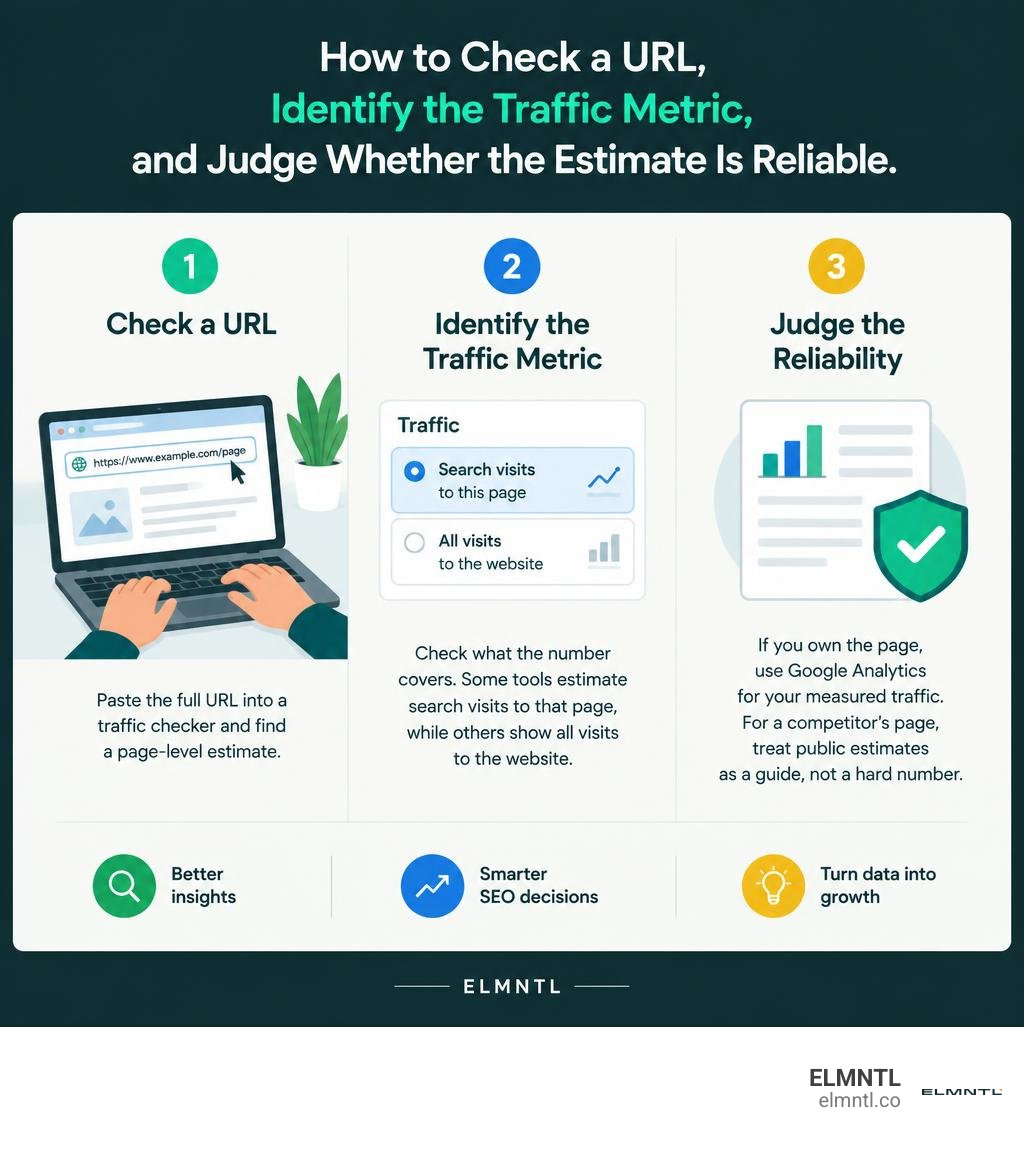
Easy url traffic checker word list:
How a URL Traffic Checker Measures Page-Level Visitors
Public visitor estimation relies on observable digital breadcrumbs. When you enter a link into a scanner, the system performs a live fetch of the HTML, looks at server response headers, and scans for connected marketing technology. It is a quick way to stop guessing web traffic and start using a site statistics checker to guide your content strategy.
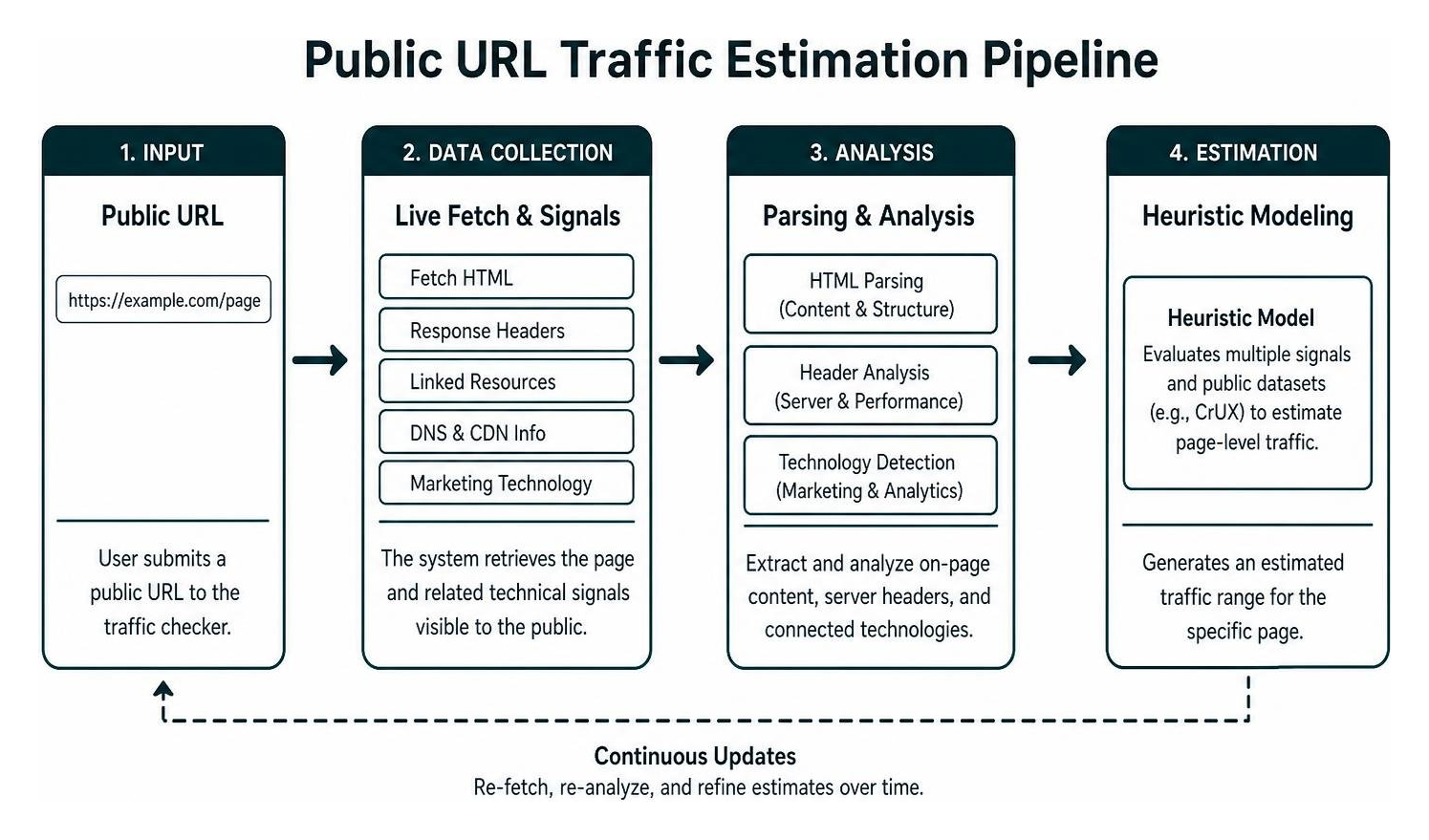
Modern heuristic models evaluate content depth, schema markup, and content management systems alongside public datasets like the Chrome User Experience Report (CrUX). These signals give an immediate snapshot of page health and visibility.
Core Data Signals Used by an Online URL Traffic Checker
Public estimation platforms combine multiple independent data streams rather than relying on a single data point. When a tool scans a page via services like the Check Website Traffic — Free Website Traffic Checker | Organic Visit engine, it cross-references live HTTP headers, DNS configurations, content delivery network (CDN) fingerprints, and global rank databases.
| Data Dimension | First-Party Analytics (e.g., Google Analytics) | Third-Party Public Traffic Estimator |
|---|---|---|
| Data Source | Direct JavaScript tag execution and server logs | Live HTML signals, global rank lists, and search index sampling |
| Access Requirement | Full administrative backend access | Zero access required; public URL query |
| Metric Precision | Exact visitor sessions, events, and conversions | Modeled visitor ranges and relative traffic rankings |
| Competitor Tracking | Own properties only | Any accessible public domain or individual URL |
| Primary Use Case | Conversion tracking and internal funnel optimization | Competitive intelligence, backlink auditing, and niche validation |
Evaluating Estimate Accuracy Versus First-Party Analytics
Third-party traffic tools do not tap into private server logs. Instead, they calculate directional estimates. For massive websites, the numbers are often close to reality. For instance, global platforms show huge numbers in public trackers: Google processes around 86.6 billion monthly visits, YouTube captures 30.4 billion, Instagram generates 7.6 billion, ChatGPT logs 5.6 billion, TikTok draws 3.8 billion, WhatsApp logs 3.7 billion, Wikipedia hits 3.5 billion, and Amazon reaches 2.8 billion.
For small sites, public estimates can vary. Treat public numbers as directional benchmarks rather than accounting figures. You can explore our website statistics complete guide to learn how internal and external measurement techniques differ across web environments.
Essential Traffic Metrics and Benchmarks for Modern Websites
Reviewing a URL involves several core performance metrics:
- Estimated Monthly and Daily Visits: Total session volume directed to the specific domain or URL.
- Traffic Channels: The breakdown between organic search, direct visitors, social referrals, and paid campaigns.
- Engagement and Bounce Rates: How long visitors stay on the page and whether they interact before leaving.
- Geographic Distribution: The regional spread of visitors, which highlights high-value markets.
To see how daily visitors add up over a campaign lifecycle, check our guide to find out exactly how many visitors any website gets each day.
Realistic Traffic Benchmarks by Industry and Site Type
Traffic expectations vary widely depending on business models, competition levels, and audience size.

| Website Category | Early Stage (0–6 Months) | Growth Stage (6–18 Months) | Mature Benchmark |
|---|---|---|---|
| Content Blog | 100 to 500 visits/month | 1,000 to 5,000 visits/month | 25,000+ visits/month |
| Local Service Business | 500 to 1,500 visits/month | 2,000 to 5,000 visits/month | 5,000 to 20,000 visits/month |
| SaaS & B2B Tech | 1,000 to 3,000 visits/month | 5,000 to 15,000 visits/month | 50,000+ visits/month |
| E-Commerce Store | 1,500 to 5,000 visits/month | 10,000 to 30,000 visits/month | 50,000+ visits/month |
A newly launched blog typically takes 6 to 12 months of consistent publishing to cross the 1,000 monthly visitor mark. Local service businesses do well with 5,000 to 20,000 focused monthly visits, while SaaS and e-commerce stores often require 50,000 or more monthly visits to drive steady revenue.
Top Categories of Free and Bulk Web Traffic Checkers
Public traffic checking tools fall into three main categories:
- Instant Web Fetch Scanners: Fast tools that require no account creation, such as the Free Website Traffic Checker With Fast Speed – Unlimited Use scanner, which audits technical metadata and heuristic authority scores immediately.
- Search Engine Index Analyzers: Specialized SEO tools that calculate traffic by multiplying organic keyword rankings by average click-through rates.
- Global Leaderboard Platforms: Aggregators that track domain performance, top country sources, and web trends over time.
For a complete walkthrough of tracking metrics as a beginner, review our resource on how to stop guessing: a beginner’s guide to get site statistics.
Choosing the Right URL Traffic Checker for Your Strategy
Pick an analytics tool that matches your operational goals. If you need quick competitive intelligence, a no-signup web scanner is ideal. For running deep keyword audits or comparing historical organic rank shifts, search-focused platforms work best.

Look for platforms that display confidence ratings alongside their traffic estimates. A clear confidence label helps you weigh the data accurately before investing resources into new campaigns.
Conducting Competitor Research and Multi-URL Audits
Evaluating competitor URLs helps you spot market gaps and refine your own content plans. By checking top-performing pages across competing domains, you can see which topics earn search share and attract real audience attention.
This approach is also useful for backlink prospecting. Auditing target sites lets you verify that a potential partner receives genuine traffic before you reach out. You can learn more about this process in our guide to check website traffic of competitors to uncover their growth secrets.
Strategic Playbook: Growing Page Traffic After Auditing Your Numbers
Checking your current numbers is only the first step. Turning that baseline data into steady traffic growth requires a clear optimization workflow.
- Target Search Intent: Update content to match the exact problems your target audience is trying to solve.
- Strengthen Technical SEO Foundations: Improve page speed, clean up site architecture, and make sure search engines can crawl your key pages easily.
- Expand Content Depth: Update older articles with fresh research, clear examples, and structured data markup.
- Earn High-Quality Backlinks: Build relationships with respected publishers in your industry to increase your domain authority.
For a deeper dive into search-driven measurement techniques, check our guide on using a free SEO website traffic checker to refine your site audit process.
Converting Raw Traffic Data into Measurable Revenue
Traffic numbers alone will not grow a business if visitors leave without taking action. High-intent search terms often convert far better than broad informational queries, even when their search volume is lower.
Align your high-traffic pages with clear conversion paths, such as downloadable resources, product demos, or newsletter signups. To learn more about building sustainable digital marketing systems, see why every growing brand needs a reliable traffic analysis website.
Frequently Asked Questions About Checking Website Traffic
What is a good monthly traffic number for a new website?
For a brand-new content blog, reaching 1,000 monthly visits within the first 6 to 12 months is a solid milestone. Local service websites often see strong results with 5,000 to 20,000 visits per month, whereas SaaS platforms and e-commerce stores typically need 50,000 or more monthly visits to maintain profitable customer acquisition funnels.
Can I check traffic for multiple URLs at the same time?
Yes, several traffic tools offer bulk analysis features that allow you to scan anywhere from 10 to 200 URLs in a single batch. This makes it easy to compare competing sites side-by-side without entering links one by one.
Does a free URL checker show exact Google Analytics numbers?
No. Google Analytics data is private to the site owner. Free public traffic checkers use modeled algorithms, live HTML signals, and search ranking databases to calculate estimates. These numbers provide reliable directional benchmarks for competitive research, but they are not exact server-log counts.
Conclusion
Understanding webpage performance is essential for making smart marketing decisions. Public traffic tools give you the competitive intelligence needed to spot search opportunities, evaluate backlink partners, and measure market share.
At ELMNTL, we help brands combine traffic analytics with targeted SEO, web development, and content strategies that turn everyday page views into long-term growth. When you are ready to evaluate the top tools side by side, read the ultimate best free website traffic checker showdown to choose the right platform for your tech stack.